SEO analysis: how to analyze a website for SEO in 5 steps
A practical SEO analysis of a website in five steps: technical health, content, keywords and rankings, backlinks and AI visibility, with real examples.
An SEO analysis is not a score out of 100. A score tells you something is wrong; it does not tell you what to fix first, or whether fixing it will change anything.
A useful website SEO analysis answers five questions in order. Can search engines crawl and index the site? Do the pages say clearly what they are about? Which searches does the site actually show up for? Who links to it? And when people ask AI assistants instead of Google, does the brand come up at all?
This guide walks through each step: what to look at, what normal looks like and what to do with the findings. The screenshots use a fictional demo site, acme.example, a sportswear store with the kind of fixable issues every real site has. At the end is a short workflow for running the whole analysis in SEO Sauna, in the app or from an AI assistant.
What an SEO analysis should tell you
Before you open any tool, decide what the analysis is for. "Check our SEO" produces a long list of warnings. "Find out why the category pages lost traffic" or "see what to fix before the redesign" produces decisions.
A good analysis ends with three things:
- A short list of problems that block results, ranked by impact, not by how alarming they sound.
- A list of opportunities: keywords you almost rank for, pages that could rank with better content, sites that link to competitors but not to you.
- A baseline of rankings, issue counts and AI visibility, so you can see next quarter whether the work paid off.
You need two sources of data. A crawler shows what is on the site. Google Search Console shows what Google did with it. Keyword, backlink and AI data come from third-party sources and fill in the rest.
Step 1: Technical health
Start here, because nothing else matters if pages cannot be crawled and indexed. Run a site audit that follows links the way a search engine does, and read the summary before the details.
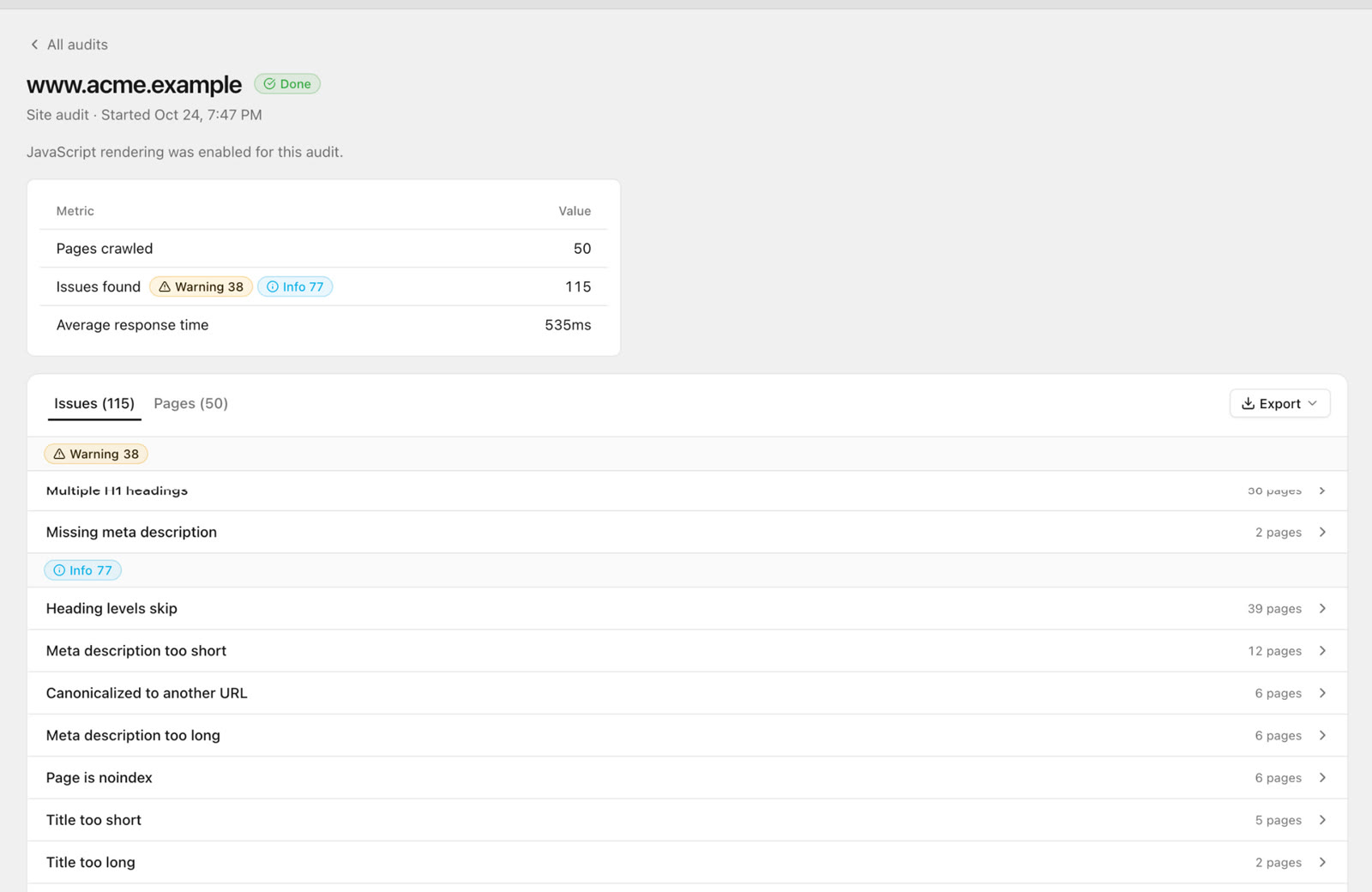 A 50-page audit of acme.example: 115 issues, mostly info-level. Multiple H1 headings show up on 36 pages.
Screenshots show SEO Sauna with a fictional demo site, acme.example.
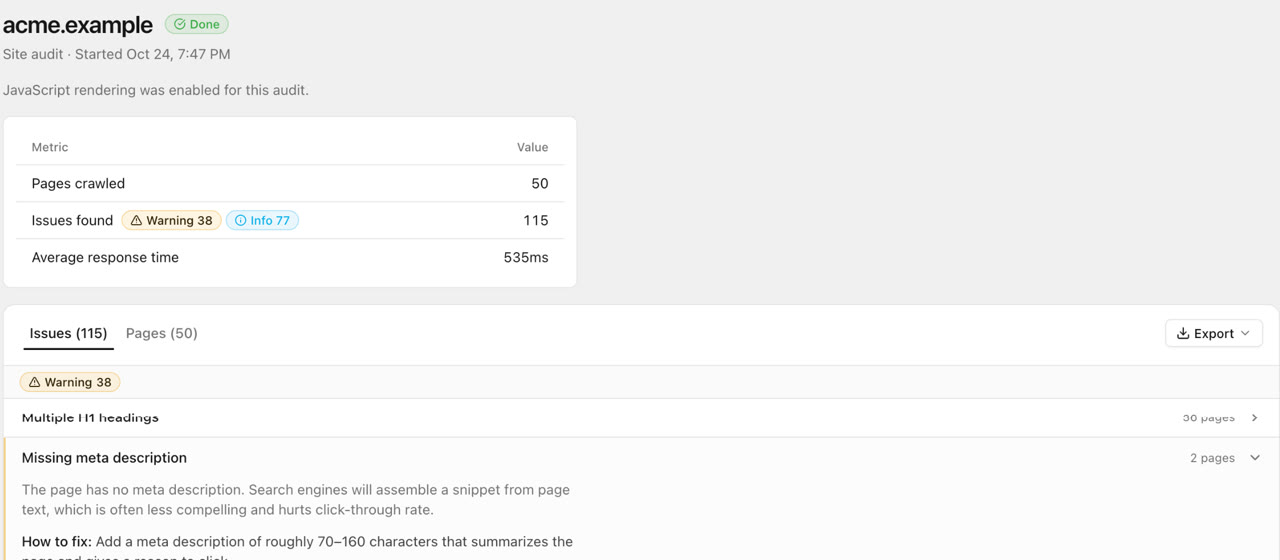
On acme.example, a 50-page crawl found 115 issues: 38 warnings and 77 info items, with an average response time of 535 ms. The most common were heading levels that skip (39 pages), multiple H1 headings (36 pages) and meta descriptions that are too short (12 pages). There were also a few pages canonicalized to another URL, a few marked noindex, and one page the crawler could not read.
None of this means acme.example is broken. Large sites built on shared templates always produce issues like these, and many info items are deliberate choices. That is the first lesson of any SEO analysis: every site has fixable issues, and the count matters less than which ones touch your important pages.
What to check first:
- Pages that should be indexed but are not: noindex tags, canonicals pointing elsewhere, blocked by robots.txt.
- Errors and redirects: 4xx and 5xx responses, redirect chains, internal links to redirected URLs.
- Unreadable pages: if the crawler could not read a page, find out why before trusting the rest. Bot protection and rate limits are common causes.
- Speed outliers: a single slow template affects every page built on it.
Open each issue and look at the affected pages. A good audit explains why the issue matters and how to fix it.
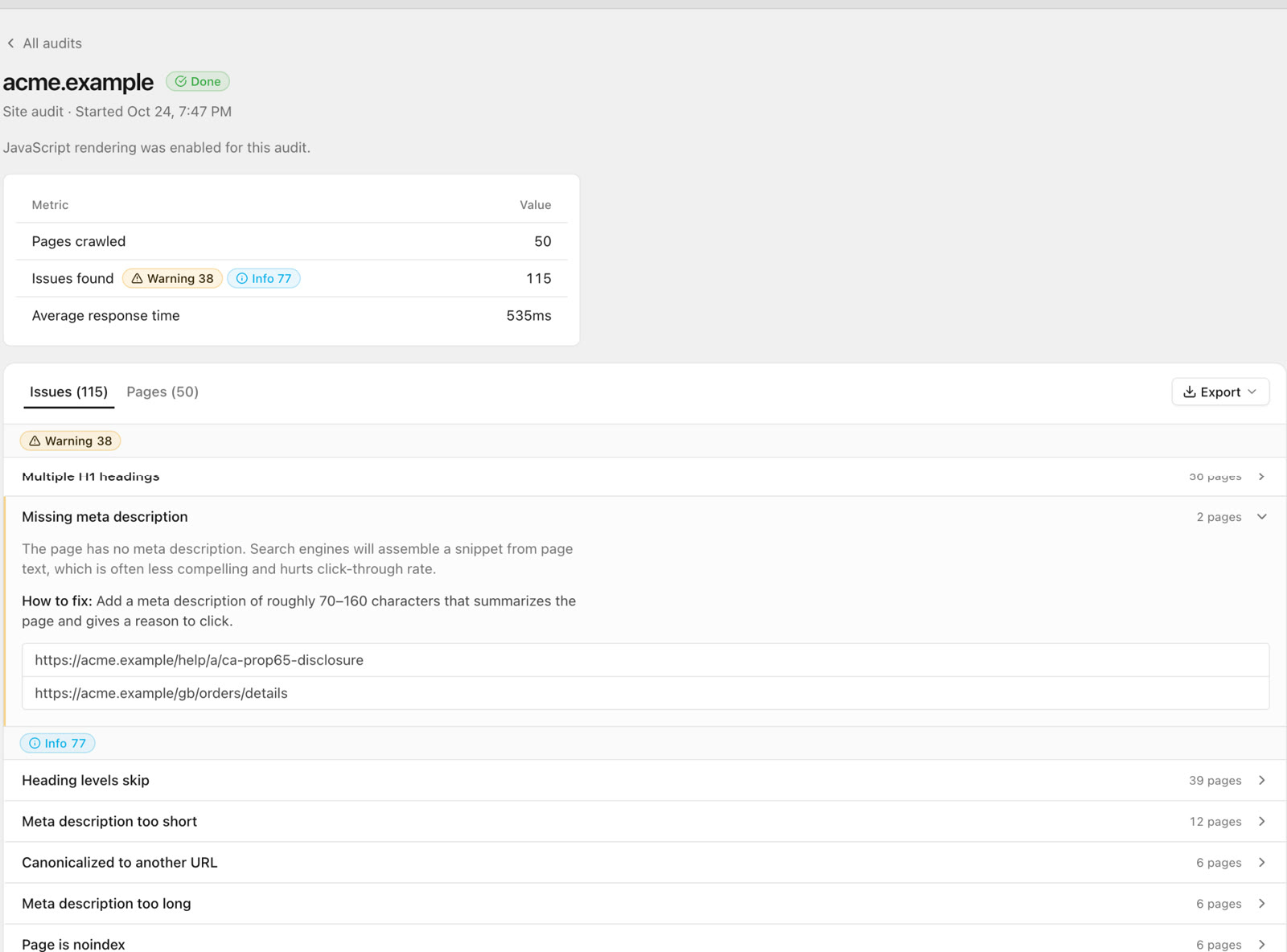 Each issue opens to why it matters, how to fix it and the affected URLs.
Multiple H1 headings is a typical template problem. The UK home page and the help pages on acme.example both have two H1s. Fixing the template once fixes every page built on it, which is why grouping issues by template beats fixing URLs one by one.
The full technical checklist, from robots.txt to JavaScript rendering, is in the technical SEO audit checklist. For an analysis, you only need to know whether there is a blocking problem and where it lives.
Step 2: On-page and content
Once pages can be indexed, check whether each one says clearly what it is about and whether it deserves to rank.
The crawled pages table is the quickest way in. Sort by template and scan the columns: status, title, H1 count, word count, images and response time.
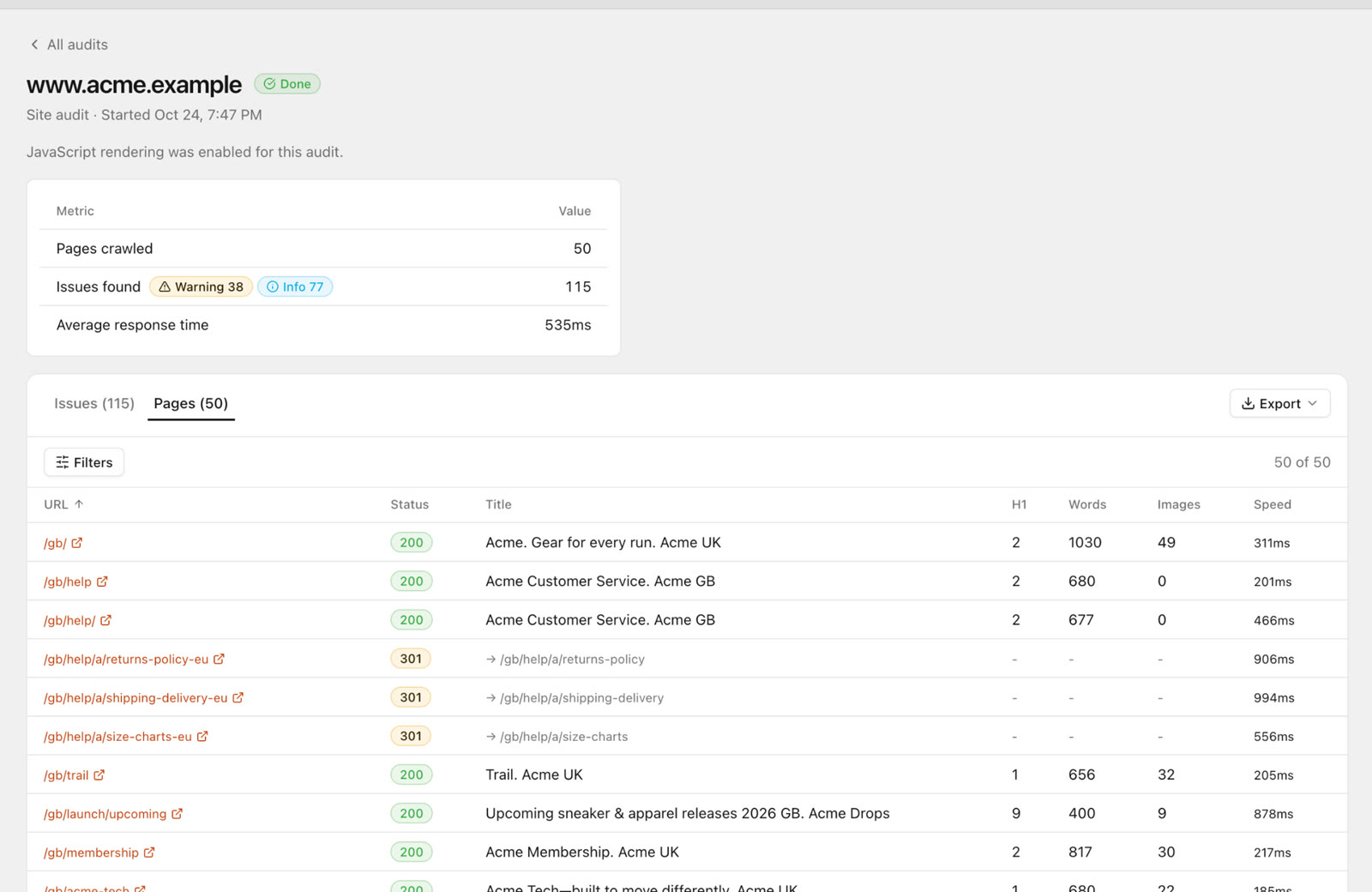 Every crawled URL with status, title, H1s, word count, images and speed. Several help pages on acme.example return 301 redirects.
Things to look for:
- Titles: missing, duplicated, too long to display, or too short to say anything. Each important page should have a unique title that contains the main search term near the start.
- Meta descriptions: they do not affect rankings directly, but they affect clicks. Missing or very short descriptions mean Google writes its own snippet.
- Headings: one H1 that matches the page's topic, then a logical H2 and H3 structure.
- Thin pages: low word counts are fine on a product page with good specs, but a guide or category page with 80 words rarely ranks for anything competitive.
- Internal links to redirects: in the acme.example table, several help URLs return 301. Internal links should point to the final URL.
Then read your most important pages as a searcher would. Does each one answer the question better than the pages that currently rank? A crawler cannot tell you that.
Step 3: Keywords and rankings
Technical and content checks tell you whether pages can rank. Rankings tell you whether they do.
Start with Google Search Console. The Performance report shows the queries that already bring impressions and clicks. Look for:
- Queries in positions 5 to 20. These are the cheapest wins. The page already ranks; it needs better content, better internal links or a better title.
- Pages with many impressions and a low click-through rate. Usually a title or description problem.
- Important pages with almost no impressions. Either they are not indexed, or they target the wrong search terms.
Then track the keywords that matter to the business, not just the ones you already rank for. Rank tracking adds what Search Console does not show: exact positions on a schedule, competitor positions and which SERP features appear for each keyword.
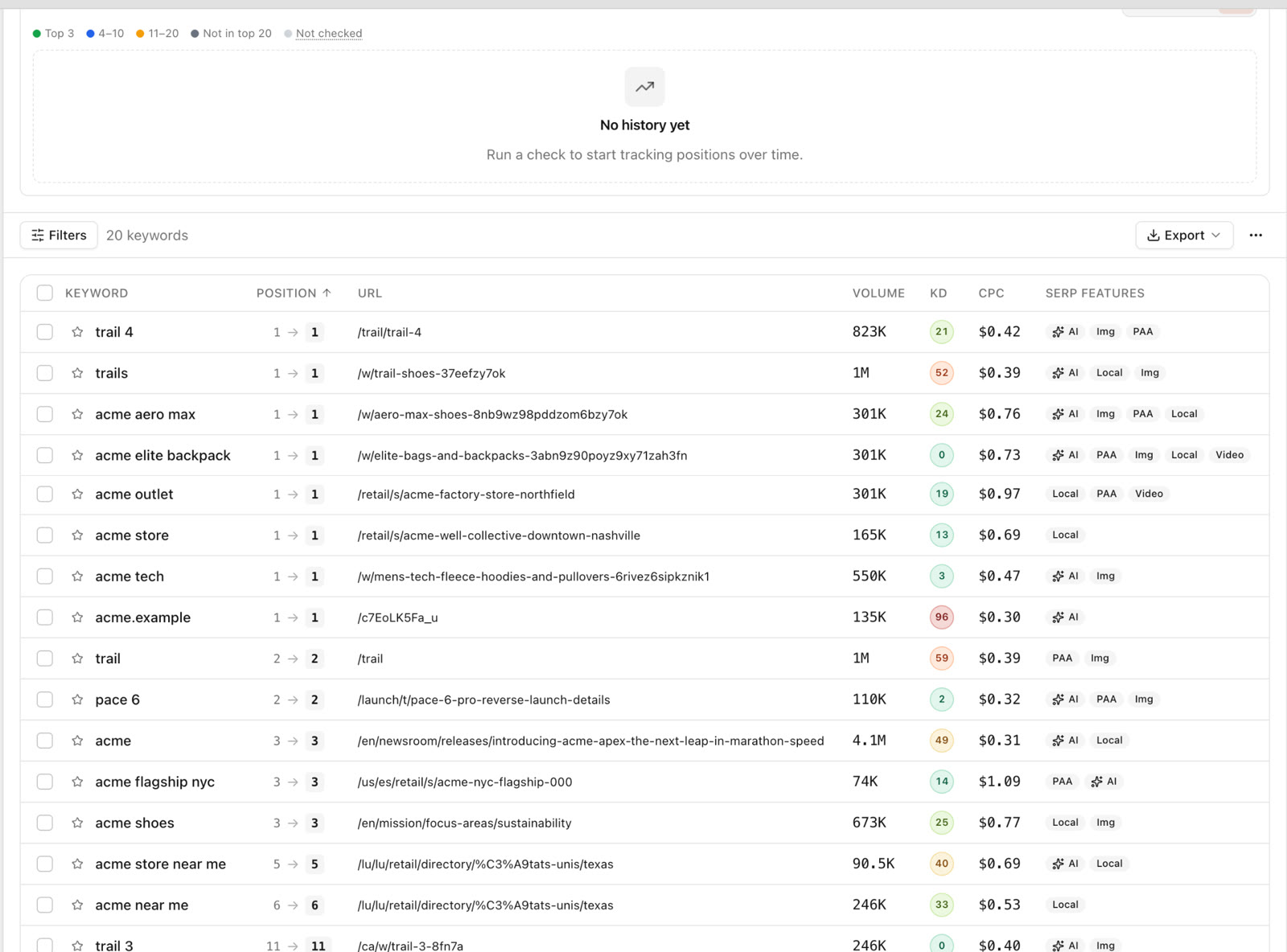 Rank tracking for acme.example (US, mobile): positions, ranking URL, volume, difficulty, CPC and SERP features such as AI Overviews and People Also Ask.
The SERP features column matters. If a keyword shows an AI Overview, images, a local pack and videos, position 3 may sit far down the screen, which changes how much traffic the ranking is worth. See the best rank trackers for what to look for in a tracker, and the AI Overview tracker guide for monitoring the AI part of Google.
Check one more thing here: is the right page ranking? If a blog post ranks for a keyword that a product or service page should own, you have a cannibalization problem, and fixing the internal links and content often moves the right page up.
Step 4: Backlinks and authority
Links from other sites are still one of the strongest ranking signals. You do not need a perfect link profile, but you need to know where you stand compared with the sites that outrank you.
Look at:
- Referring domains, not raw link counts. A hundred links from one site count for much less than ten links from ten relevant sites.
- Which pages earn links. Usually the home page and a few resources. If your money pages have no links, internal links from the linked pages are the fastest way to share that authority.
- Competitor gaps. Sites that link to two or three competitors but not to you are the best outreach targets, because they already link to your topic.
- Broken links pointing at you. Links to pages that now return 404 are wasted. Redirect those URLs to the closest live page.
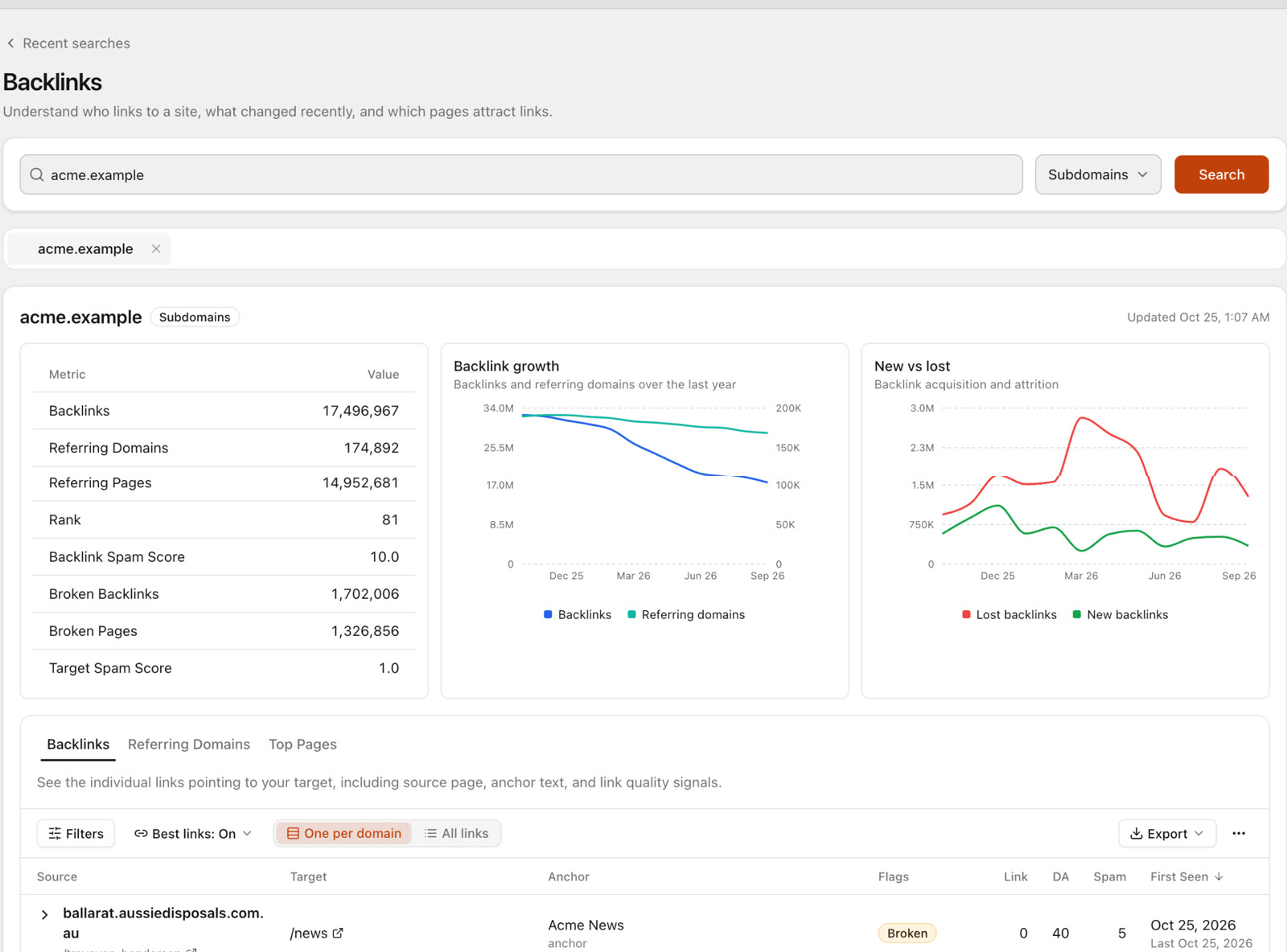
The link prospecting guide shows how to turn a backlink gap into a list of sites worth contacting.
Step 5: AI visibility
A growing share of searches end inside an AI answer: Google's AI Overviews, ChatGPT, Claude, Gemini or Perplexity. A classic SEO analysis does not look there at all, so add one step.
Write down 10 to 30 questions your customers would actually ask an assistant, such as "what are the best running shoes for beginners?" rather than your brand name. Then check two things for each: is your brand mentioned, and is your site cited as a source?
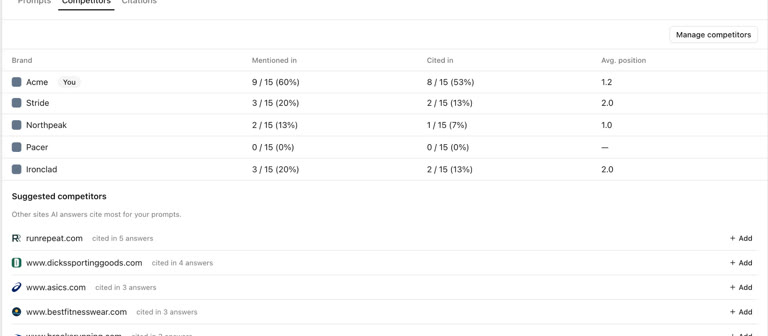
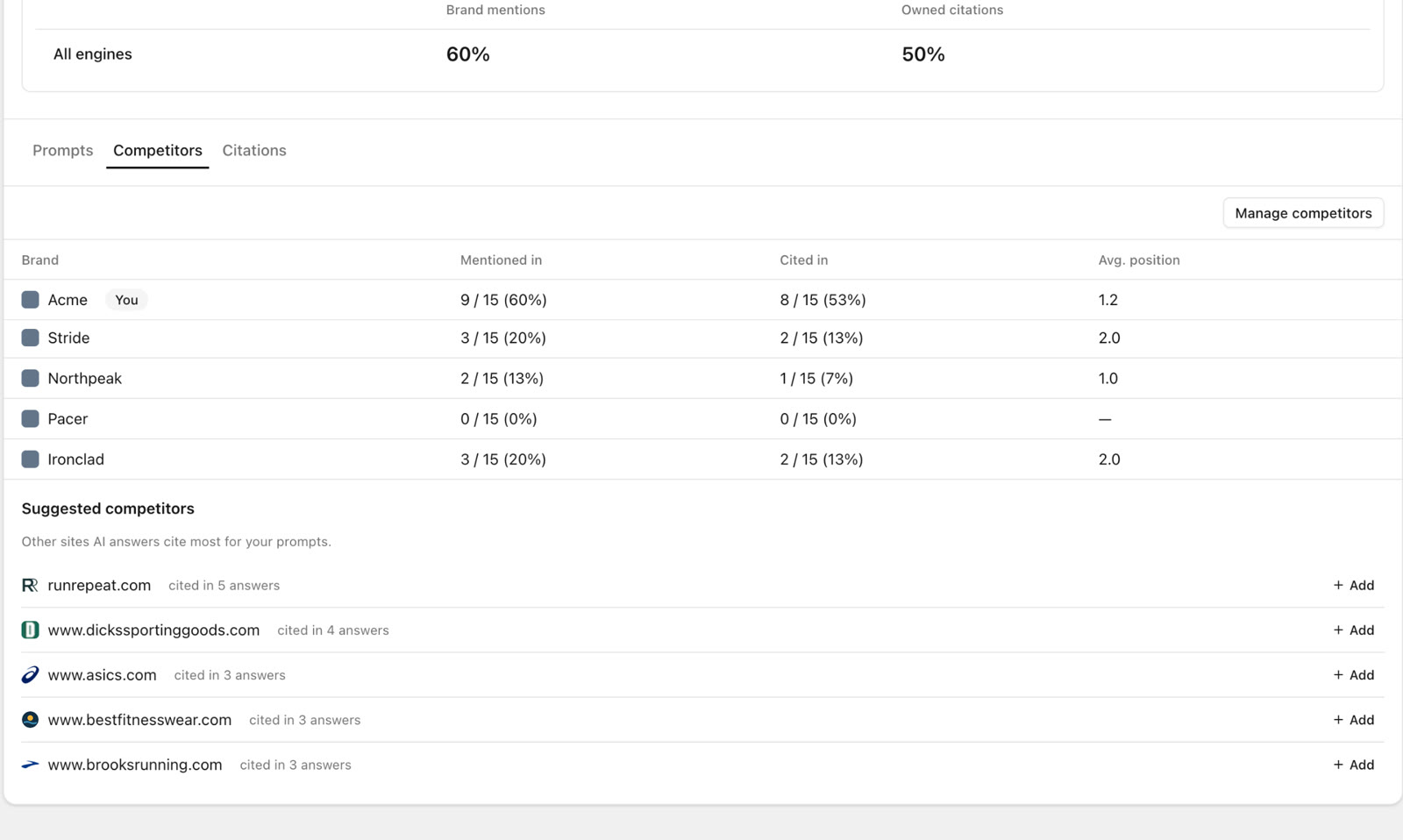 Across 15 prompts, Acme was mentioned in 9 answers (60%) and cited in 8 (53%). The sites AI cites most include runrepeat.com and dickssportinggoods.com.
In the acme.example example, Acme was mentioned in 9 of 15 answers and cited in 8. Stride and Ironclad appeared in 3, Northpeak in 2 and Pacer in none. The more useful finding is in the suggested competitors: review and retail sites such as runrepeat.com, dickssportinggoods.com and asics.com are what the assistants cite. Those are the sources to earn mentions on.
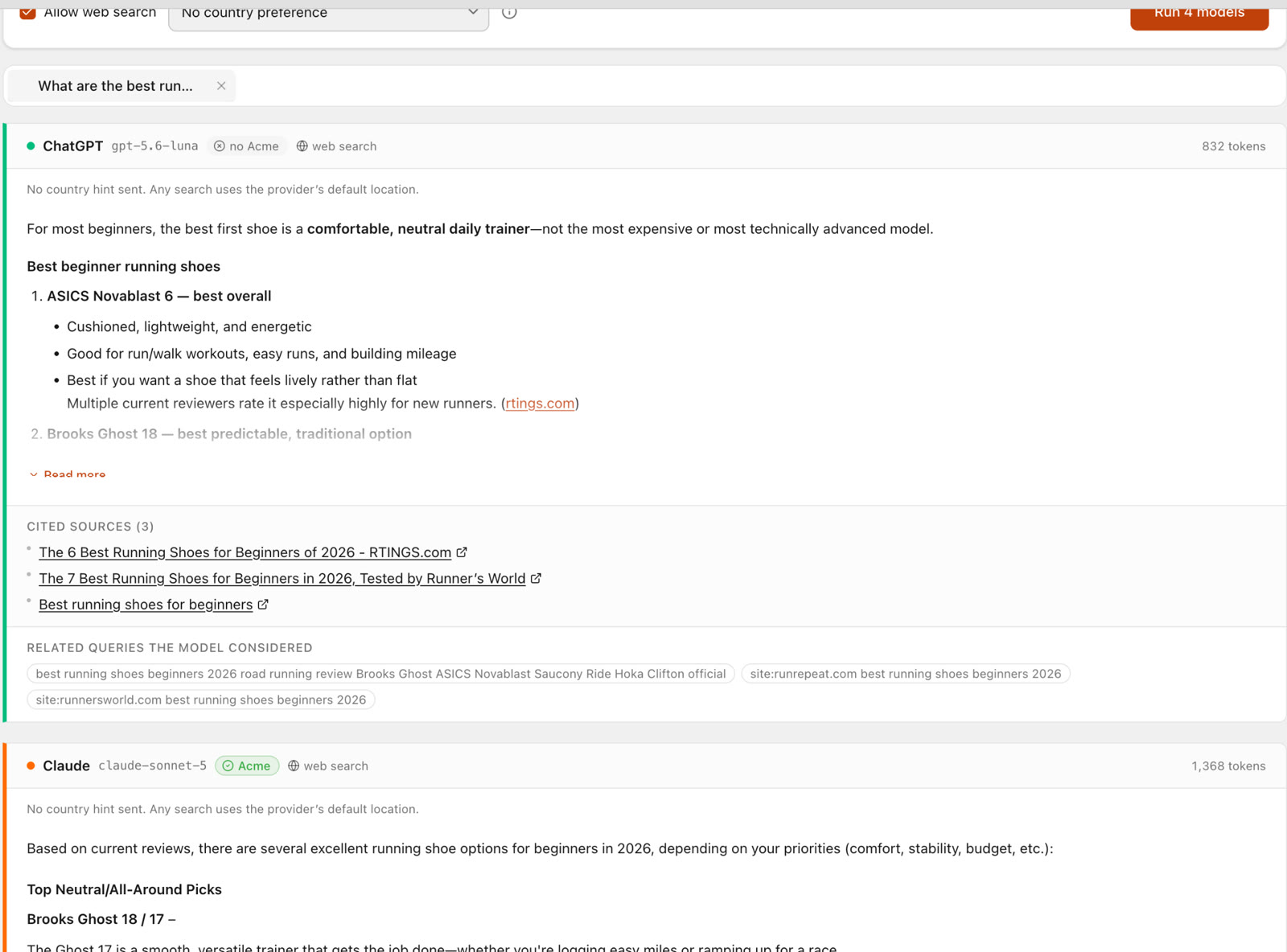 Same question, different answers: ChatGPT recommends ASICS Novablast and Brooks Ghost and cites RTINGS and Runner's World; Claude mentions Acme.
For a beginner running shoe question, ChatGPT did not mention Acme at all. It recommended ASICS and Brooks and cited RTINGS and Runner's World. Claude did mention Acme. If a brand that leads its own competitor table can be missing from an answer, every brand should check rather than assume. ChatGPT rank tracking goes deeper into setting up those checks.
Turn findings into a plan
At this point you have a lot of findings. Sort them into three groups:
- Blocking: indexing problems, broken important pages, server errors. Fix now.
- High leverage: template issues affecting many pages, keywords in positions 5 to 20, important pages with no internal links. Fix next.
- Housekeeping: info-level issues on low-value pages. Batch them, or accept them.
Write down the baseline numbers and run the same analysis again in three months.
How to run this SEO analysis in SEO Sauna
SEO Sauna covers all five steps in one workspace:
- Site Audit crawls from 10 up to 10,000 pages, with optional Lighthouse checks and JavaScript rendering. Issues are grouped by severity, each with an explanation, how to fix it and the affected pages, and results can be exported.
- GSC Insights shows your own Search Console clicks, impressions, CTR and positions. Reading it uses no credits.
- Rank Tracking checks your keywords on a weekly or daily schedule, by device and country, with SERP features.
- Domain Overview and Backlinks show organic footprint, referring domains and links for your site or any competitor.
- Prompt Explorer compares ChatGPT, Claude, Gemini and Perplexity answers side by side, and Prompt Tracking checks your questions on a schedule and records mentions, citations and competitors.
Every part also works from an AI assistant through the SEO Sauna MCP server. Connected to Claude, ChatGPT, Cursor or Codex, you can run the analysis as a conversation:
Run a site audit on example.com up to 200 pages, pull my Search Console queries in positions 5 to 20, and compare our referring domains with competitor.com. Give me the ten fixes with the biggest impact, in order.
The assistant fetches the data, reads it and explains its reasoning. Check its recommendations before you change anything. The docs cover setup, and SEO Sauna 101 is a plain tour of every feature.
FAQ
What is the difference between an SEO analysis and an SEO audit?
An audit usually means the technical crawl: status codes, indexing, canonicals, speed. An SEO analysis is broader. It includes the audit, plus content, keywords and rankings, backlinks and, today, AI visibility.
How often should I analyze my website for SEO?
A full analysis every quarter is enough for most sites, plus a run before and after any redesign or migration. Rank tracking and AI visibility checks can run weekly in the background.
Can I do an SEO analysis for free?
Partly. Search Console, Lighthouse and a manual review cover the basics. Rankings for keywords you do not yet rank for, competitor backlinks and AI visibility need paid data. SEO Sauna starts free with 1,000 trial credits and no card; the paid plan is €59 a month excluding VAT and includes 17,000 credits.
How many issues is normal?
There is no normal number. A 50-page crawl of acme.example found 115, mostly info-level. Look at severity and at which pages are affected, not at the total.
Ready to analyze your own site? Start free in SEO Sauna.
More from the blog
 AI discoverability audit: how to run an AI visibility audit
An AI discoverability audit shows whether ChatGPT, Gemini and Google AI name and cite your brand, and why not. Steps, prompts and what to fix first.
AI discoverability audit: how to run an AI visibility audit
An AI discoverability audit shows whether ChatGPT, Gemini and Google AI name and cite your brand, and why not. Steps, prompts and what to fix first.
 ChatGPT MCP server for SEO: connect live SEO data
Connect an SEO MCP server to ChatGPT as a custom connection on Free or paid plans: step-by-step setup, error fixes and SEO prompts with real keyword data.
ChatGPT MCP server for SEO: connect live SEO data
Connect an SEO MCP server to ChatGPT as a custom connection on Free or paid plans: step-by-step setup, error fixes and SEO prompts with real keyword data.