SEO Sauna 101: what it is and what you can do with it
A plain tour of SEO Sauna: keyword, competitor and backlink research, rank tracking, site audits, Search Console and AI visibility in your AI assistant.
SEO Sauna is an SEO platform for keyword research, domain research, backlinks, rank tracking, site audits, Google Search Console and AI visibility, in one hosted app at app.seosauna.com. Use it in the browser, or connect it to your AI assistant so it can research with real data. It is built on the open-source OpenSEO project (MIT licence) and run by Seopal Oy in Finland.
It does not automate SEO for you. SEO still needs positioning, good pages and judgment. What SEO Sauna does is put the data you need for those decisions in one place, at a flat monthly price, and make that data available to the AI assistant you already use.
Who it is for
- Small business owners and marketers who want the essentials without learning an enterprise suite.
- In-house SEOs who want their own Google data next to keyword and competitor research.
- Consultants and agencies who manage many sites. There is no per-project cap, so you can set up a project for every client, and costs follow usage instead of seats or tiers.
Two ways to use it
In the web app. Sign in, add your site as a project and use the pages in the sidebar. Viewing saved data costs nothing.
Inside your AI assistant, through MCP. MCP (Model Context Protocol) is an open standard that lets an assistant call tools on another service. Add the SEO Sauna MCP server, https://app.seosauna.com/mcp, to Claude, ChatGPT (as a custom connection), Cursor, Codex or another MCP client, approve the sign-in, and the assistant can pull keyword volumes, rankings, backlinks and your Search Console numbers in the middle of a conversation. The MCP guide has the steps for each client, and ChatGPT setup covers ChatGPT.
Both ways share the same projects and data.
A tour of the app
The sidebar is grouped the same way this section is: Overview, Research, AI Visibility, My Site and AI Tools.
Dashboard
Answers: how is my site doing right now? Once Search Console is connected, the dashboard shows new keywords your site has just started appearing for, the top keywords that bring the most clicks, and striking-distance queries where you rank in positions 5 to 20. If you connect Google Analytics 4, your organic traffic and conversions appear there too.
What changed on my dashboard this month, and which striking-distance query should I work on first?
Keyword Research
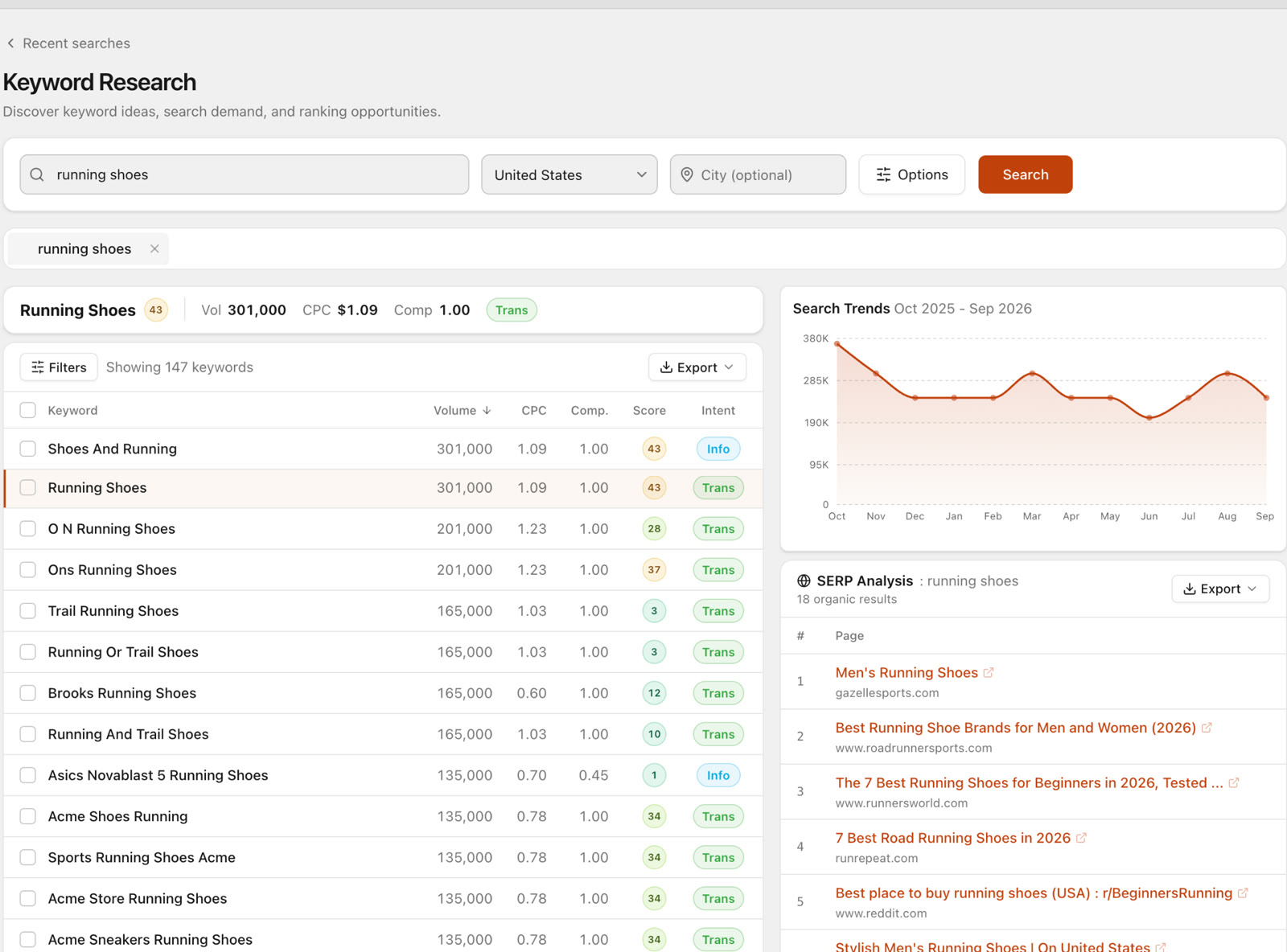
Answers: what do people search for, and which of those keywords are worth a page? Expand a seed topic into keyword ideas with search volume, difficulty, CPC, intent, trends and the current Google results, then save the good ones.
Find keyword opportunities for "invoice software for freelancers" in the UK with difficulty under 20, grouped by intent.
Domain Overview
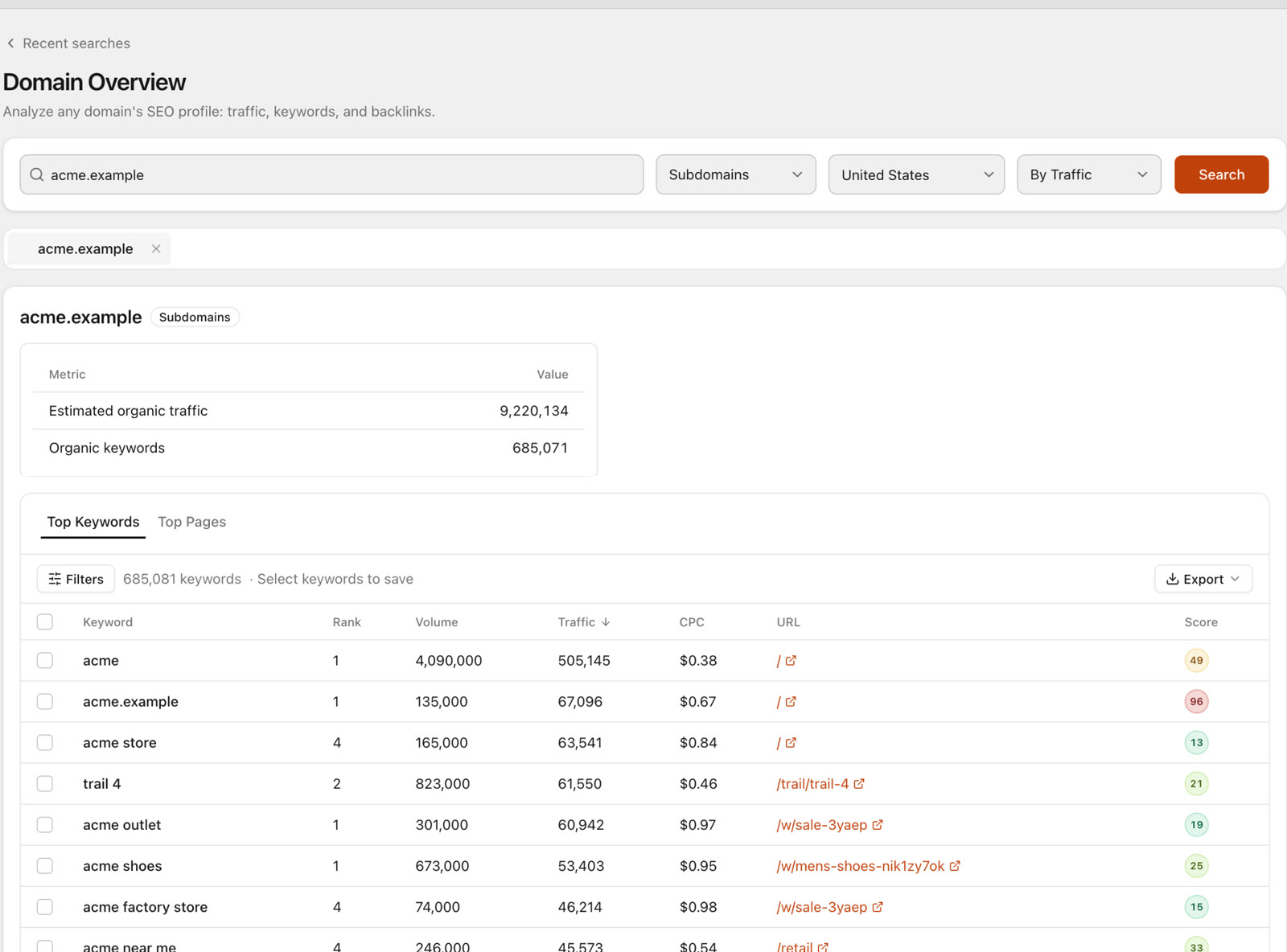
Answers: where does a site's organic traffic come from? Look up any domain, yours or a competitor's, and see its organic footprint and the keywords and pages it ranks for. Domains are looked up one at a time and use credits.
Which pages bring competitor.com the most organic traffic, and which of their keywords do we not rank for?
Backlinks
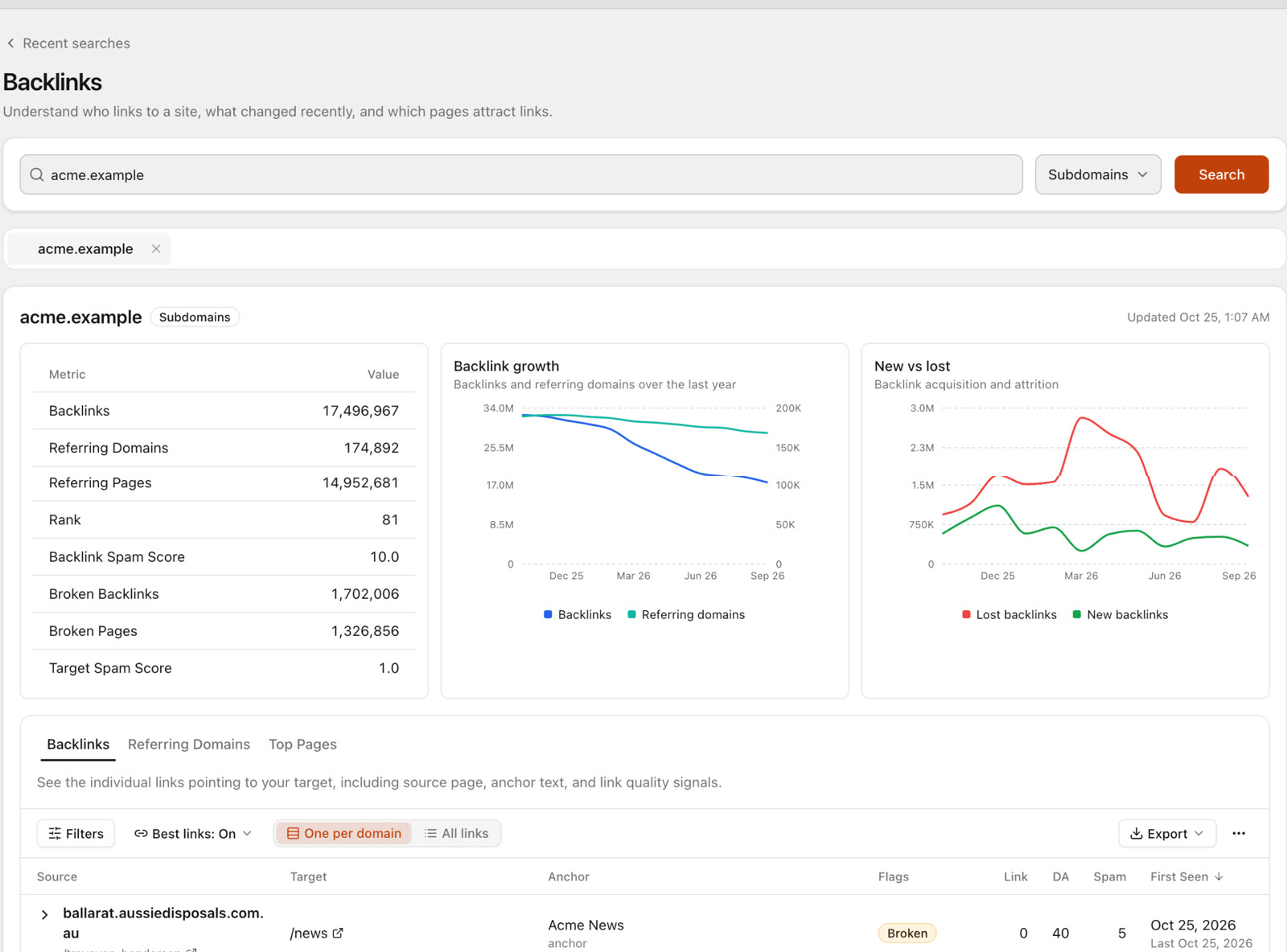
Answers: who links to a site, and how strong is its link profile? Inspect backlinks, referring domains, target URLs and link quality signals for any domain, including competitors.
Compare the referring domains of our site and competitor.com. Which sites link to them but not to us?
AI visibility: Prompt Research, Prompt Explorer and Prompt Tracking
These three pages answer one question from different angles: do AI assistants mention and cite my brand? The AI Visibility guide covers them in detail.
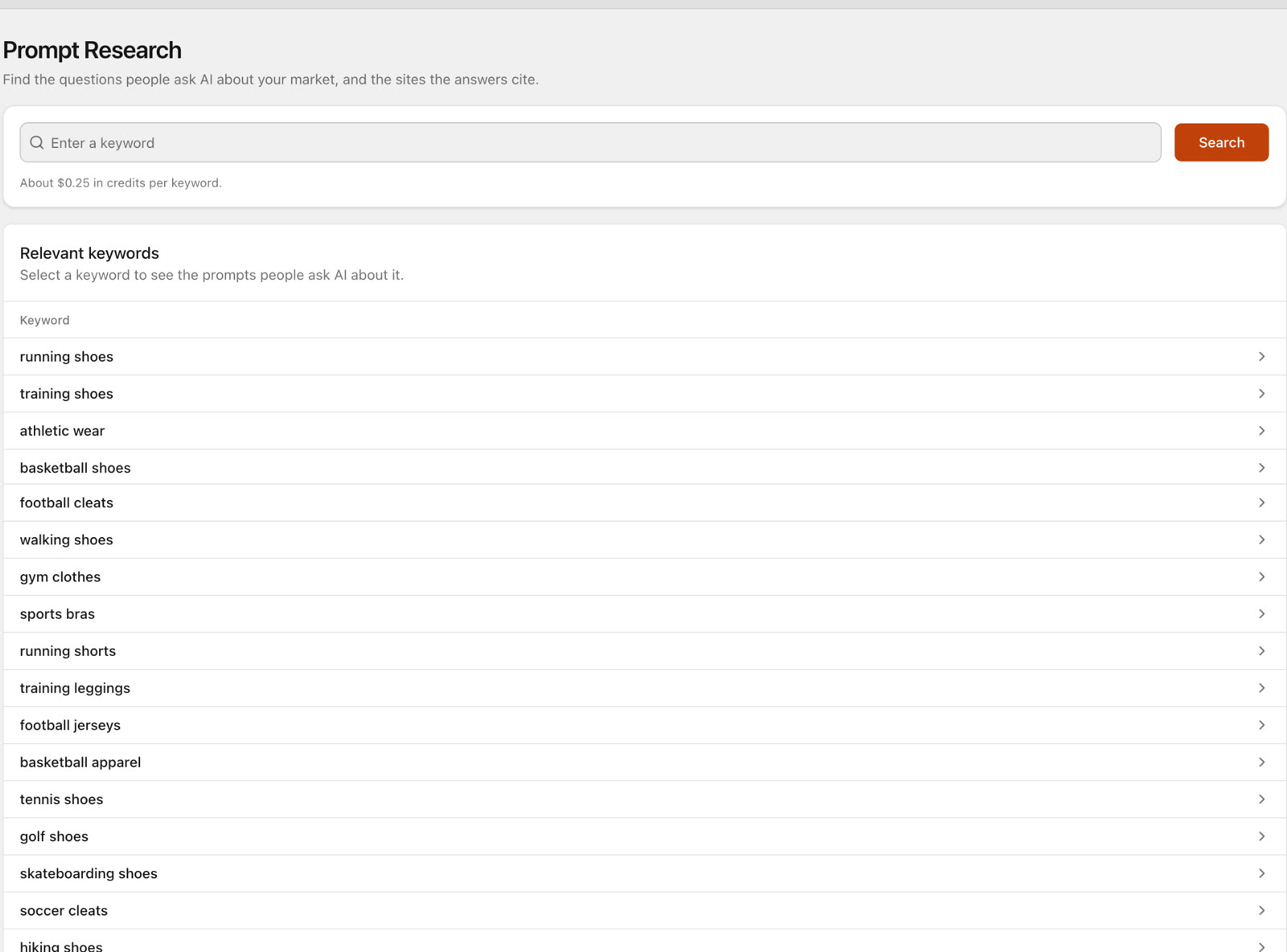
Prompt Research finds the questions people ask about a keyword, together with ChatGPT's answers and the sources they cite. The questions come mostly from Google "People also ask" data, not logged ChatGPT prompts, and SEO Sauna does not show an "AI search volume" because nobody can measure it. Research covers US English and costs about €0.25 in credits per keyword.
Research the questions people ask about "project management for agencies" and show me which sources ChatGPT cites.
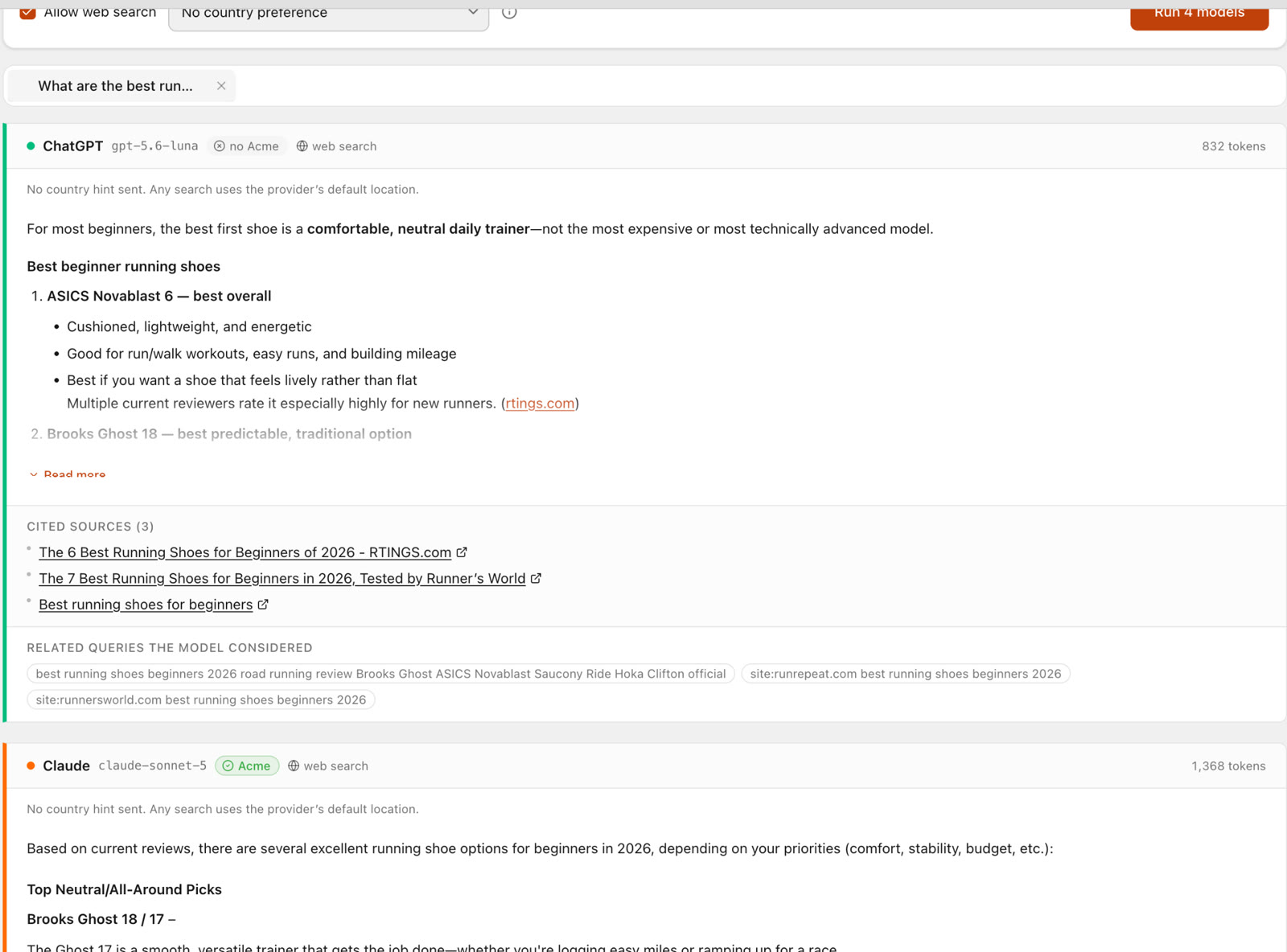
Prompt Explorer runs one prompt in ChatGPT, or side by side in Claude, Gemini and Perplexity, with the citations each gives. These are API answers, so they can differ from what people see on the consumer sites.
Ask ChatGPT and Gemini "what is the best CRM for a five-person consultancy?" and compare which brands they name.
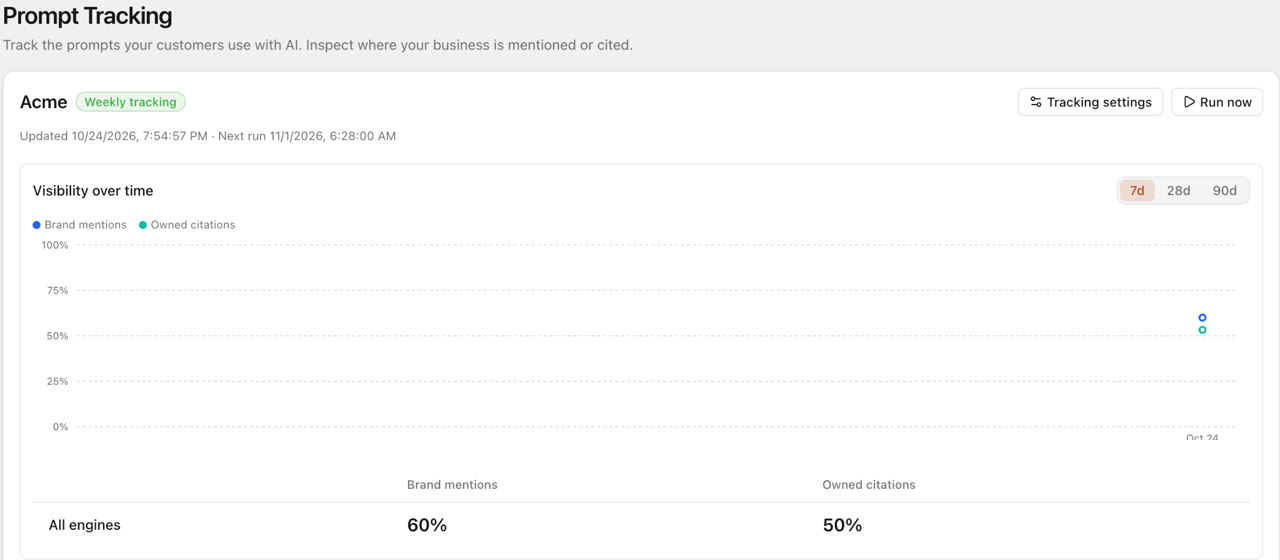
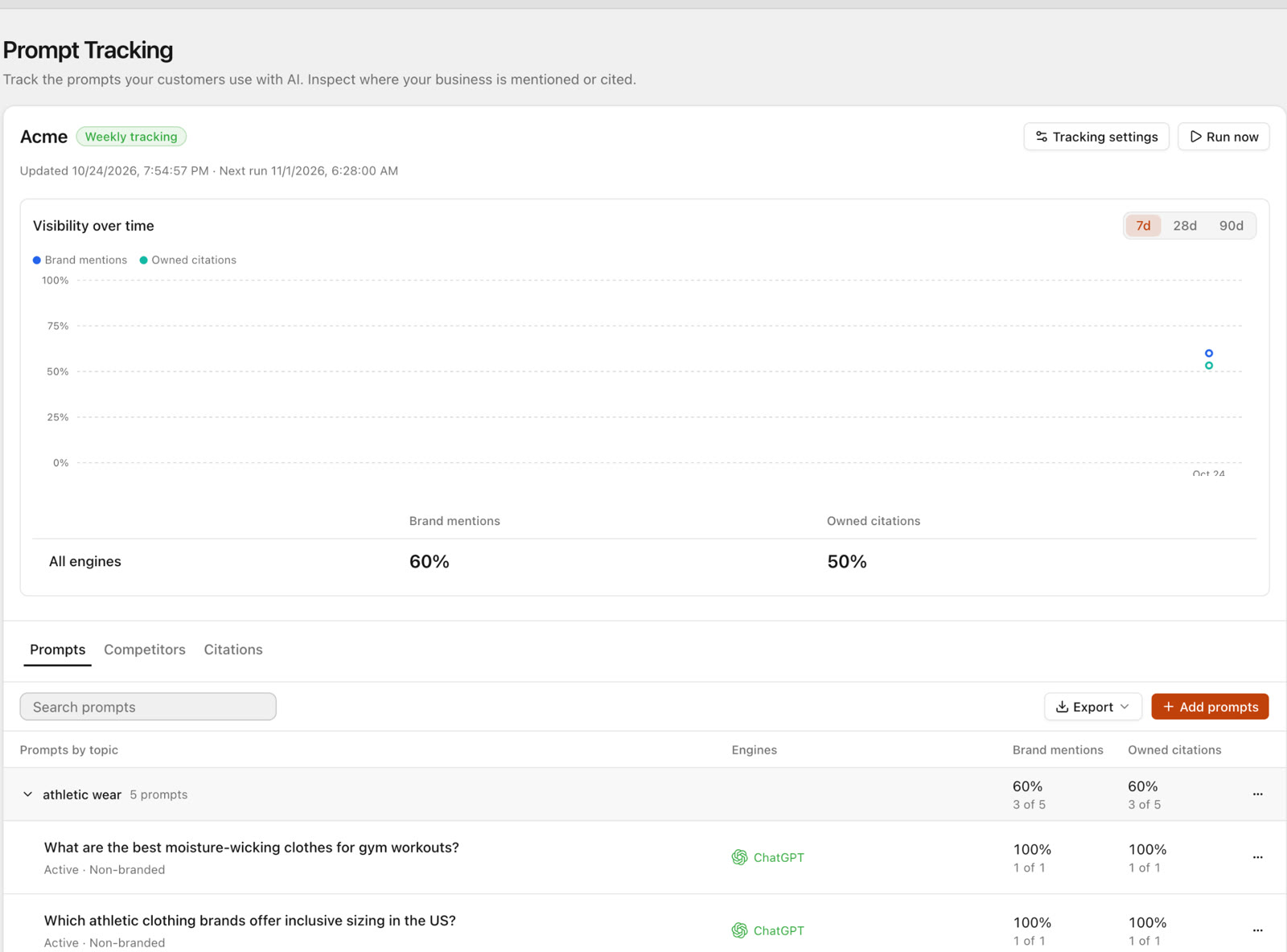
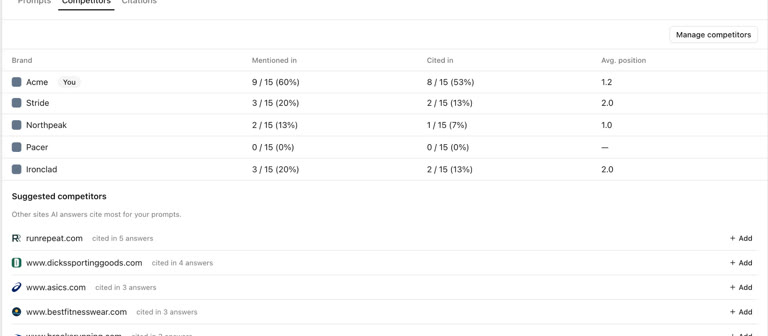
Prompt Tracking saves exact questions under topics and checks them daily, weekly or monthly in the market you choose. ChatGPT and Gemini are on by default, and Google AI Overviews, Claude and Perplexity are also supported. The Competitors and Citations tabs show brand mentions, competitor appearances and cited pages over time. You see a cost estimate before anything runs, and viewing or exporting saved results is free. Read more in how to track brand mentions in ChatGPT.
Set up weekly tracking on ChatGPT and Gemini in the US for these ten questions. Show me the cost estimate first.
My Site: GSC Insights
Answers: what actually happened in Google? This page shows your own Search Console data: clicks, impressions, CTR and average position by query, page, country, device and date, with up to 16 months of history. Your assistant can also run URL inspection for index status, crawl and canonical, up to 10 URLs per call. Access is read-only and uses no credits. See Google Search Console for setup.
Find queries from the last three months where we rank between positions 5 and 20 with good impressions, and suggest what to change on each page.
My Site: Rank Tracking
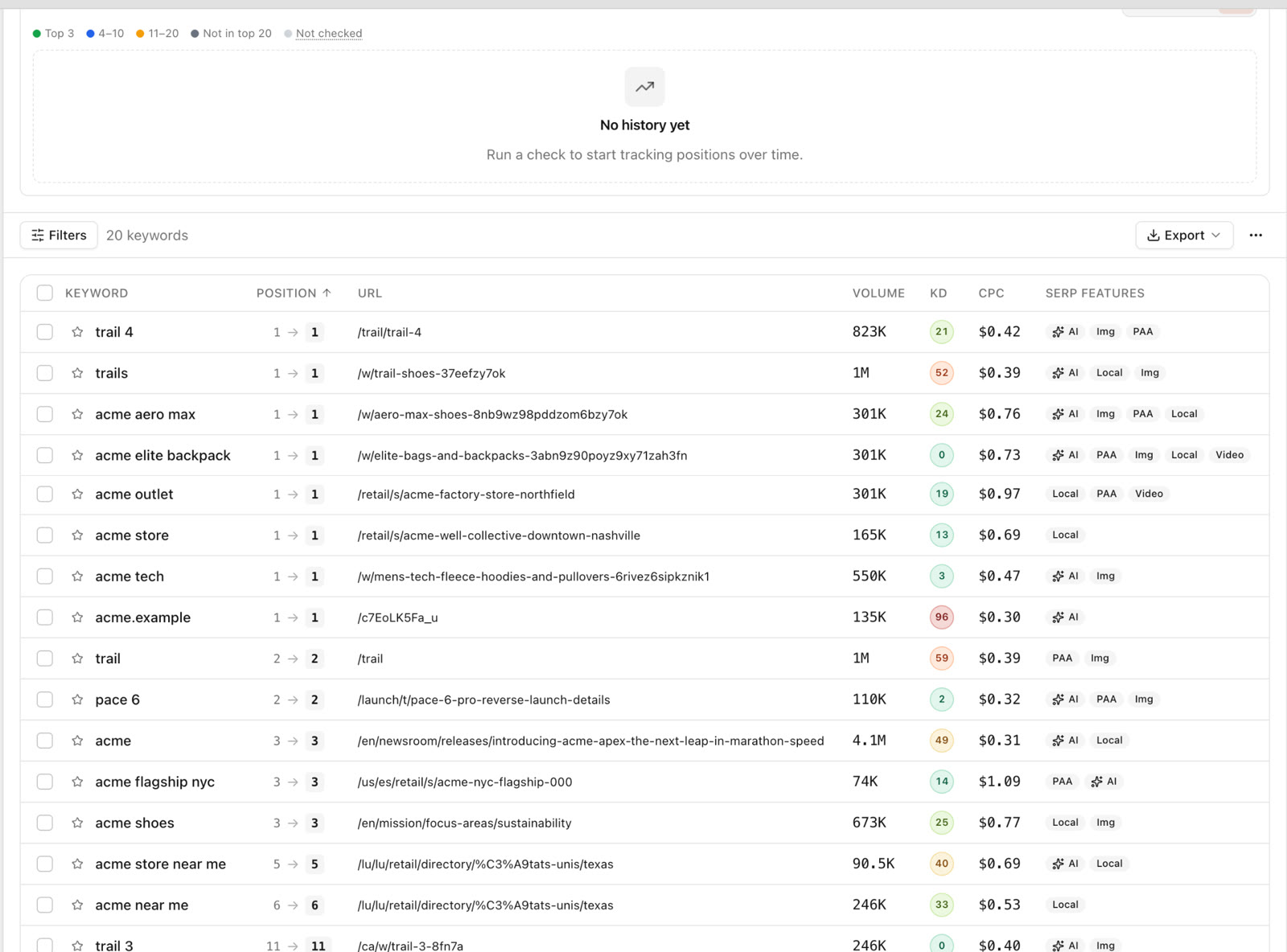
Answers: where do my keywords rank, and is it moving? You choose the keywords, devices, how many result pages deep to check and whether to run weekly or daily. A cost estimate is shown before a tracker runs. As a rough guide, 100 keywords on one device, five pages deep, weekly, costs about €1 to €2 a month.
Which tracked keywords dropped more than three positions since last week?
My Site: Saved Keywords
Answers: which keywords have I already decided are worth working on? It is the shortlist you build from research.
Cluster my saved keywords into page groups and tell me which page to write first.
My Site: Site Audit
Answers: what is technically wrong on my pages? The audit crawls your site and checks status codes, titles, meta descriptions, headings, indexability, image alt coverage, links and response time, with optional Lighthouse checks and JavaScript rendering.
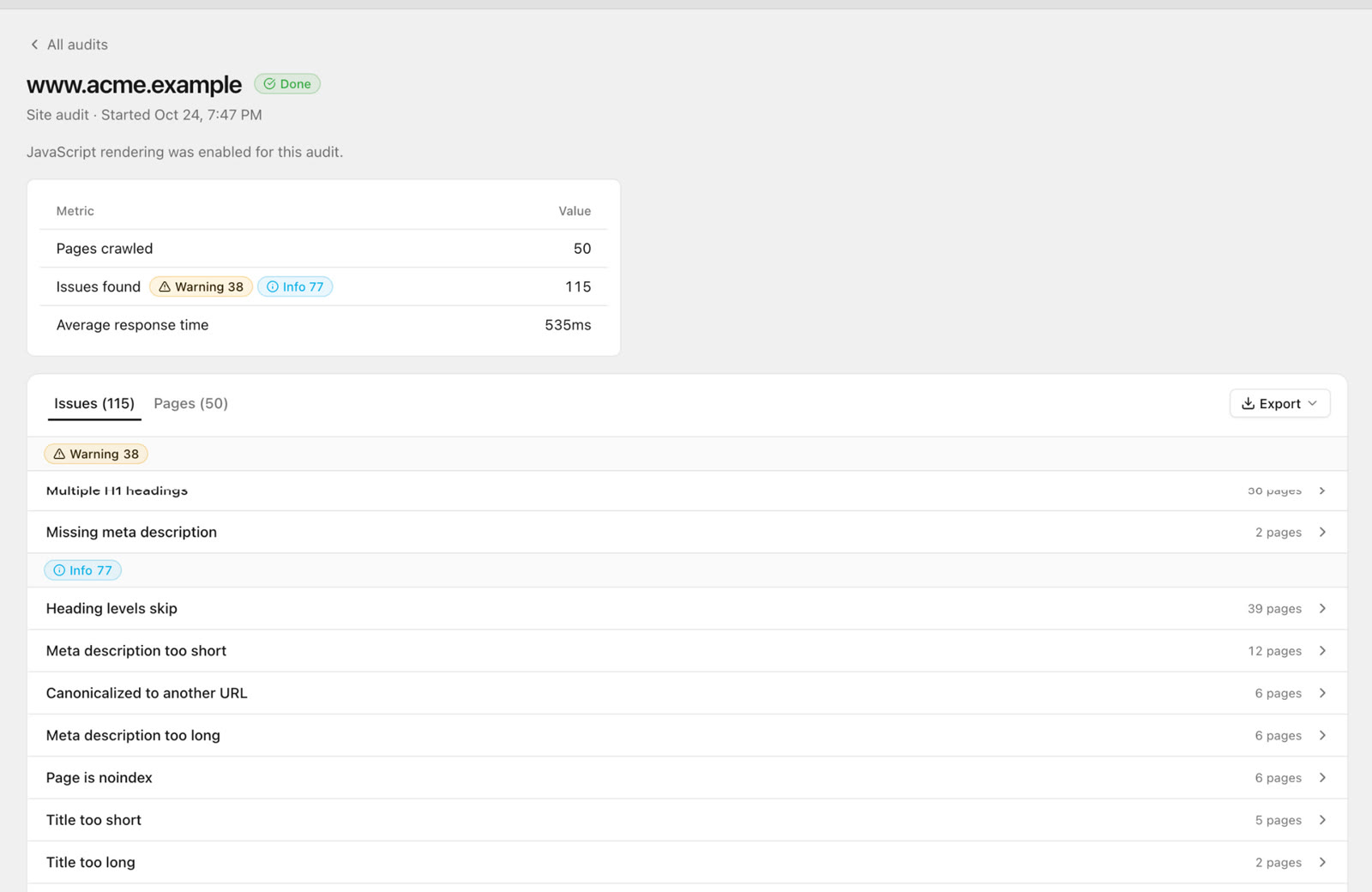
Shopify stores often rate-limit crawlers they have not authorised. If you own the store, create a crawler access signature in Shopify admin (Online Store → Preferences → Crawler access) and paste it into SEO Sauna under Project settings → Integrations → Crawler access. Shopify SEO audit walks through it. Every audit of that domain then sends the signature, so the crawl is not cut short.
Audit example.com and list the five problems most likely to affect traffic, in order.
AI Tools: Reports
Answers: where do the results of my agent's work live? An assistant connected over MCP can save a finished HTML report into your project. Anyone in your workspace can read, print or export it from the Reports page. You cannot save reports there yourself; they come from agents. Reports use no credits, and a project holds up to 10,000.
Write a competitor summary for competitor.com and save it as a report in my project.
AI Tools: Context
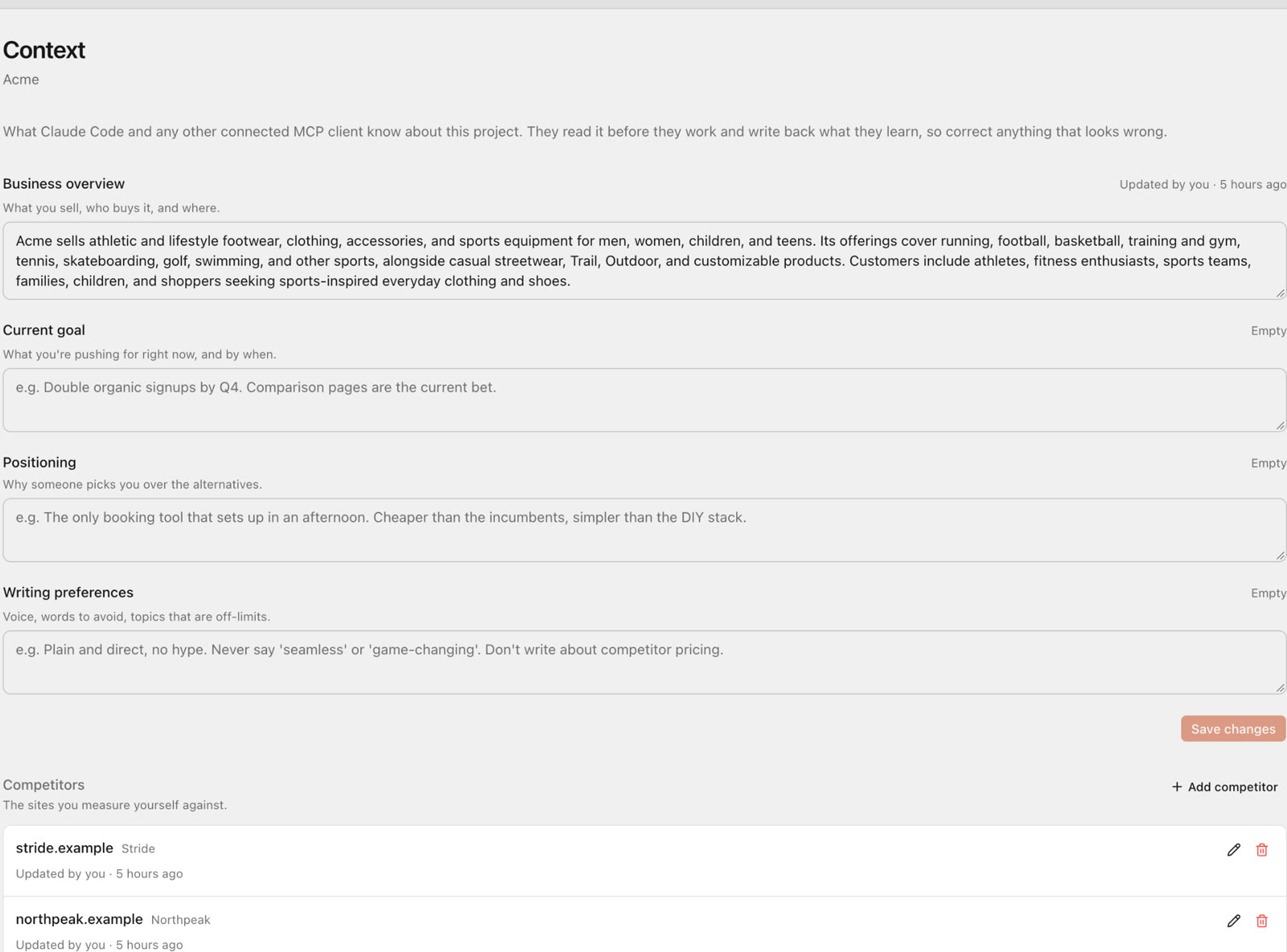
Answers: what does my assistant need to know about this business? Context holds your business, goal, positioning, writing preferences, competitors, key pages and a research log. Save it once and every conversation and skill reuses it. Reading and updating context uses no credits.
Interview me about the business, its audience and main competitors, then save it as project context.
AI Tools: Agent setup and agent skills
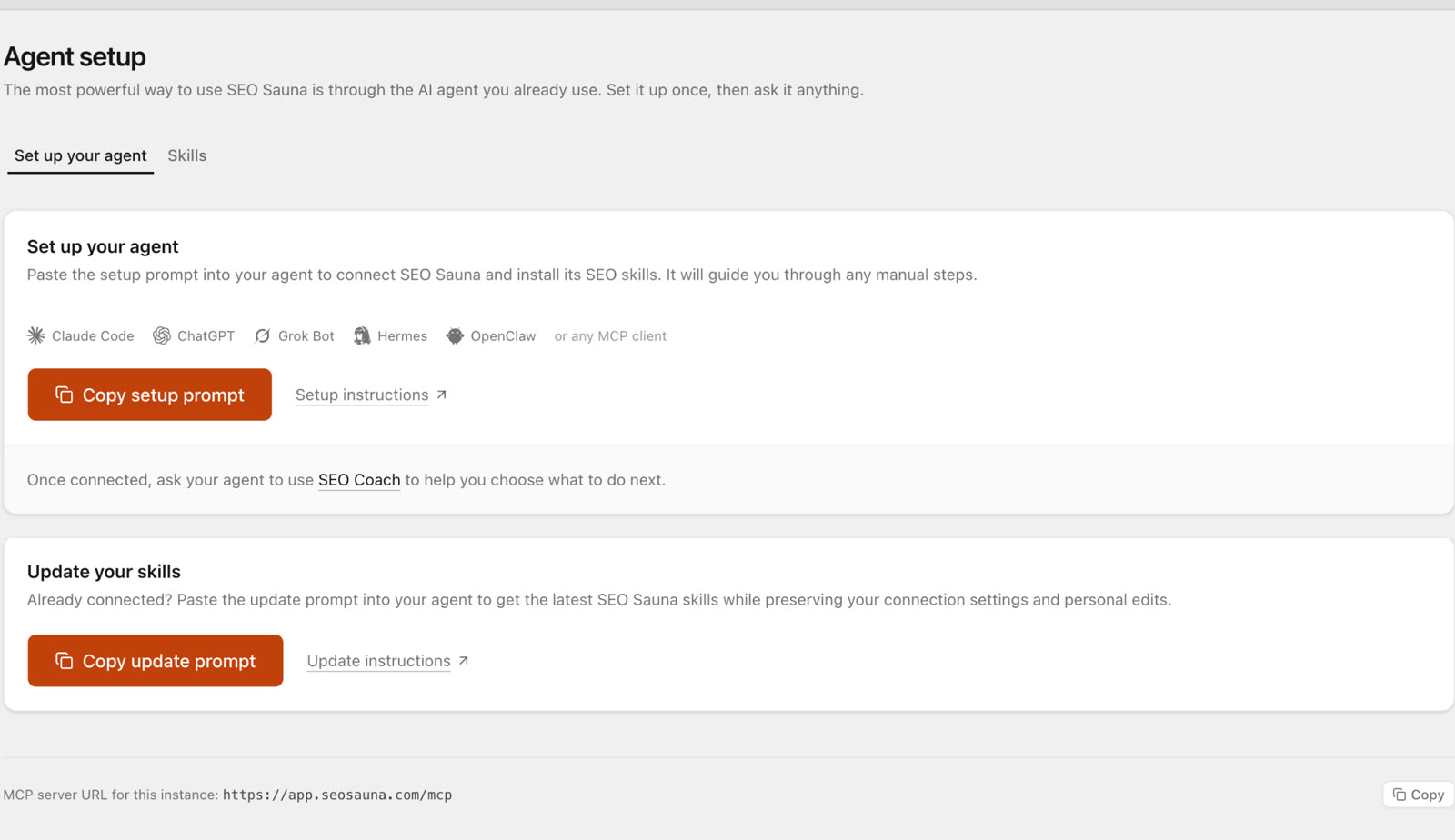
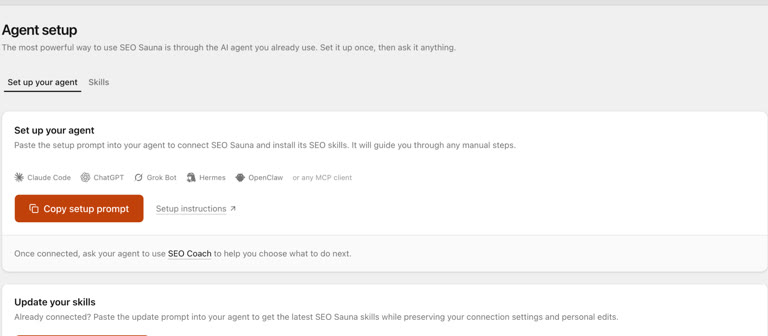
Answers: how do I connect my assistant? Agent setup gives you the MCP address and a setup prompt to paste into Claude Code, Claude Desktop, Codex or another agent, which then configures itself or lists the steps for you.
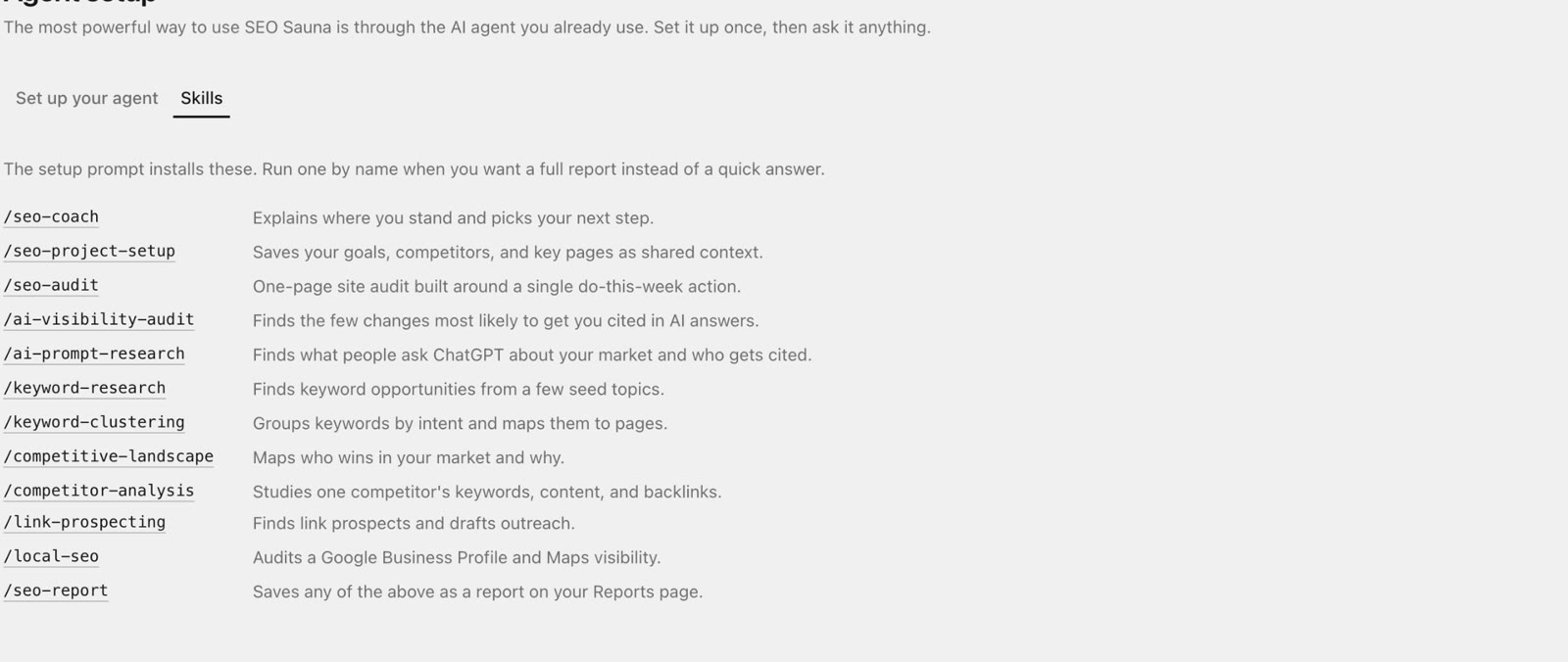
Agent skills are ready-made SEO workflows your assistant follows step by step: SEO Project Setup, SEO Coach, Keyword Research, Keyword Clustering, Competitive Landscape, Competitor Analysis, Local SEO, SEO Audit, Link Prospecting, AI Prompt Research and AI Visibility Audit.
Use SEO Coach to help me choose what to work on this week.
Team workspaces
Invite teammates to your workspace to share projects, research and results. Billing stays with the workspace owner.
How credits work
Features that fetch paid SEO data use credits. That data comes mainly from DataForSEO. Credit-using work includes keyword volumes, competitor and domain data, backlinks, rank tracking, site audits and AI visibility research and checks. Credits are shown in euros in the app.
| What | Credits |
|---|---|
| Viewing projects, settings and data you already fetched | None |
| Reading Google Search Console data | None |
| Project context and reports | None |
| Prompt Research | About €0.25 per keyword |
| Rank tracking | Estimate shown before it runs |
| Prompt Tracking | Estimate shown before it runs, billed per check |
The paid plan costs €59 a month excluding VAT (a 2026 offer, valid until further notice) and includes 17,000 credits (€17 worth) each billing cycle. Top-ups cost €1 per 1,000 credits, roll over and do not expire. Included monthly credits reset each cycle, and credits you do not use cost nothing extra: they are a usage allowance, not a fee. Billing is monthly and you can cancel anytime.
You can start for free. New accounts get 1,000 trial credits (€1) with no credit card. Prompt Tracking works on trial credits, while Prompt Research and Prompt Explorer need the paid plan.
Getting started in five steps
- Sign up for free at app.seosauna.com. No card needed.
- Add your site as a project.
- Connect Search Console and GA4. You can do this during signup, from the dashboard card or under Project settings → Integrations. Search Console access is read-only.
- Connect your AI assistant. Copy the setup prompt from Agent setup, or add
https://app.seosauna.com/mcpby hand. Then ask: "Use SEO Sauna to check my connection and list my projects." That uses no credits. - Run your first research. Save your project context first, then try one focused job, such as finding striking-distance queries or five winnable keywords. Claude SEO lists good first requests.
FAQ
Is SEO Sauna free?
You can try it for free: new accounts get 1,000 trial credits (€1) and no card is needed. The paid plan is €59 a month excluding VAT and includes 17,000 credits each month.
Do I need an AI assistant to use it?
No. Everything works in the web app. The MCP connection is an extra way to use the same data from Claude, ChatGPT, Cursor or Codex.
Where does the data come from?
Keyword, domain, backlink, SERP and ranking data comes mainly from DataForSEO. Search Console data comes straight from your own connected property.
Can I research competitors?
Yes. Domain Overview and Backlinks work on any domain, one at a time, and use credits.
Can I self-host it?
Yes. SEO Sauna is built on OpenSEO, which is open source under the MIT licence. Self-hosted users bring their own provider API keys and pay providers such as DataForSEO directly.
Will it get me more traffic?
It gives you better data for SEO decisions, not guaranteed rankings. Traffic still depends on your positioning, content quality and execution.
More from the blog
 AI discoverability audit: how to run an AI visibility audit
An AI discoverability audit shows whether ChatGPT, Gemini and Google AI name and cite your brand, and why not. Steps, prompts and what to fix first.
AI discoverability audit: how to run an AI visibility audit
An AI discoverability audit shows whether ChatGPT, Gemini and Google AI name and cite your brand, and why not. Steps, prompts and what to fix first.
 ChatGPT MCP server for SEO: connect live SEO data
Connect an SEO MCP server to ChatGPT as a custom connection on Free or paid plans: step-by-step setup, error fixes and SEO prompts with real keyword data.
ChatGPT MCP server for SEO: connect live SEO data
Connect an SEO MCP server to ChatGPT as a custom connection on Free or paid plans: step-by-step setup, error fixes and SEO prompts with real keyword data.