How to do keyword research: a practical, data-led process
How to do keyword research step by step: seed topics, volume, difficulty, intent, live SERP checks, realistic targets and tracking what you publish.
Keyword research is often treated as either trivial (type a word into a tool, sort by volume) or mysterious. It is neither. Done well, it answers two plain questions: what do the people you want to reach actually type into Google, and which of those searches can your site realistically win?
This guide walks through a process you can repeat for any site, using real data for the topic "running shoes" in the United States as the worked example. At the end it shows how to run the same process in SEO Sauna, from the web app or from an AI assistant.
What keyword research is for
The output of keyword research is not a list of keywords. It is a list of pages: what each page should be about, which searches it targets, and in what order you should write or fix them.
A huge keyword is useless if the page that would rank for it is something you cannot build. A modest one can be the best on the list if the searcher is ready to buy and the competition is weak. So for every keyword, you want to know four things:
- Demand: how many people search for it, and is that stable, growing or seasonal?
- Intent: what does the searcher want to see, an answer, a comparison or a product?
- Difficulty: how hard is it to get onto the first page today?
- Fit: can your site credibly offer the page that wins this search?
The first three come from data. The fourth comes from you.
Step 1: Start with seed topics, not keywords
A seed is a short, broad term that describes something you sell, do or know about. For a running shop that might be "running shoes", "trail running", "marathon training" and "running socks". For a SaaS product it is usually the problem the product solves, not the product's name.
Good places to find seeds:
- Your own offer and your customers' words. Product categories, service names, support tickets and reviews. Customers rarely use your internal jargon.
- Your Search Console data. Queries you already get impressions for, especially those where you sit in positions 5 to 20, are the cheapest wins on the table. The Google Search Console guide shows how to connect it.
- Competitors. The keywords and pages that bring competitors their traffic show you which topics already work in your market.
Aim for five to fifteen seeds. More than that and the next step produces more data than you can read.
Step 2: Expand each seed into keyword ideas
Put each seed into a keyword research tool and pick the country you want to rank in. Search volumes differ a lot between markets, and a keyword that is worth a page in the US may have almost no searches in Germany or Finland. If you serve a single city, set the location as well, because local results and volumes differ from national ones.
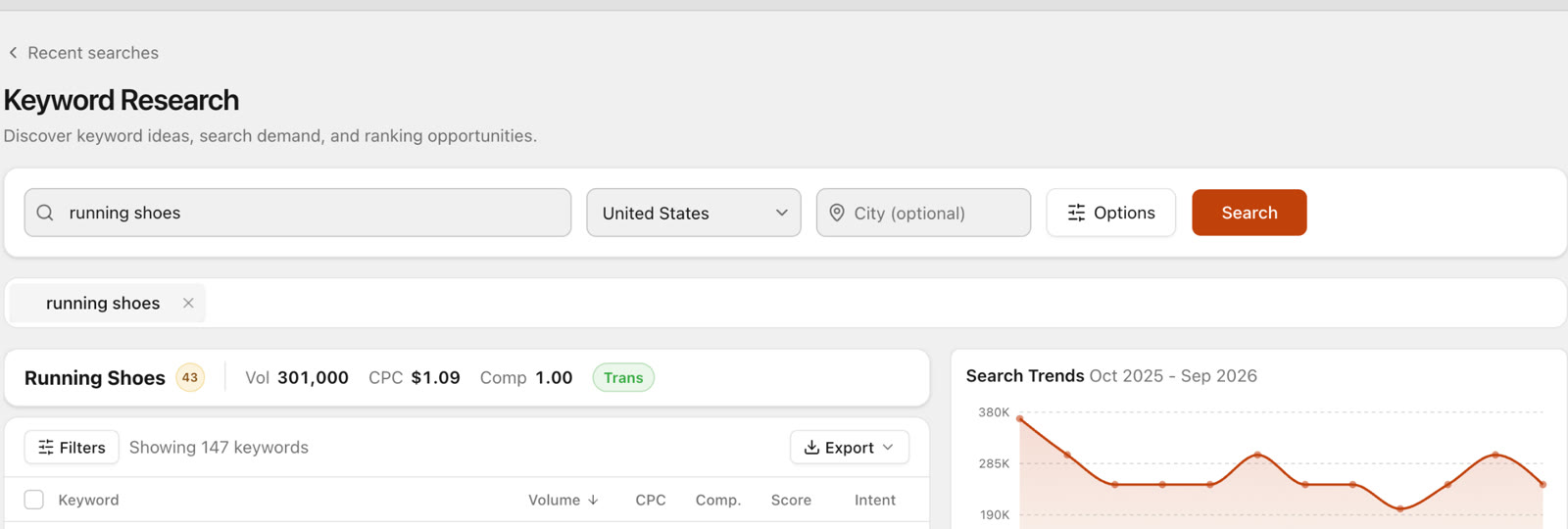 Start with one seed, one country and, if you serve a single area, a city.
Screenshots show SEO Sauna with a fictional demo site, acme.example.
One seed usually returns a long list. In this example, "running shoes" in the United States came back with 147 related keywords.
Step 3: Read the numbers, and know what each one means
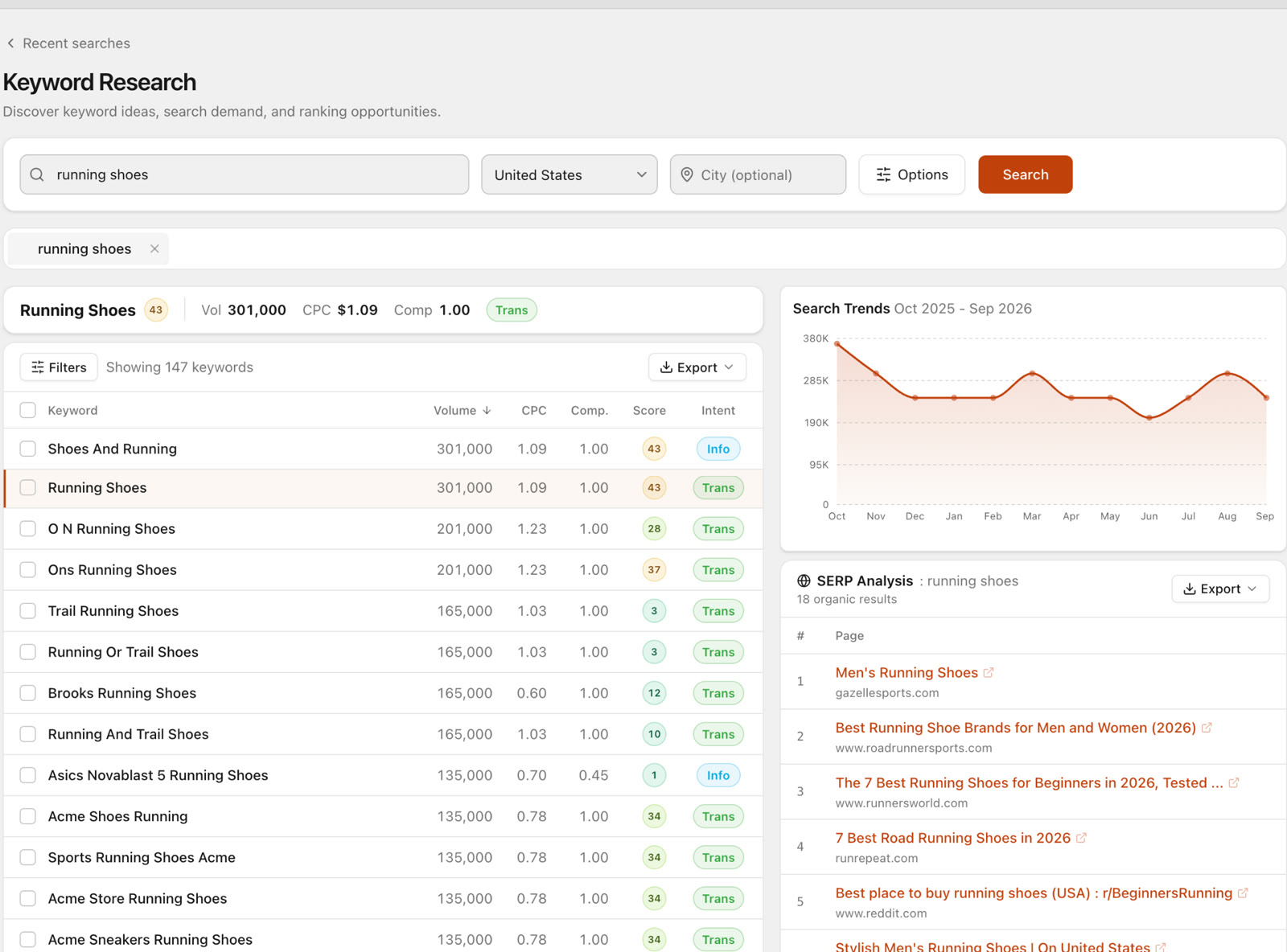 Results for "running shoes" in the US: the head term, 147 related ideas, a 12-month trend and the current Google results.
Here is what the headline row says about "running shoes" in the US, and how to read each figure.
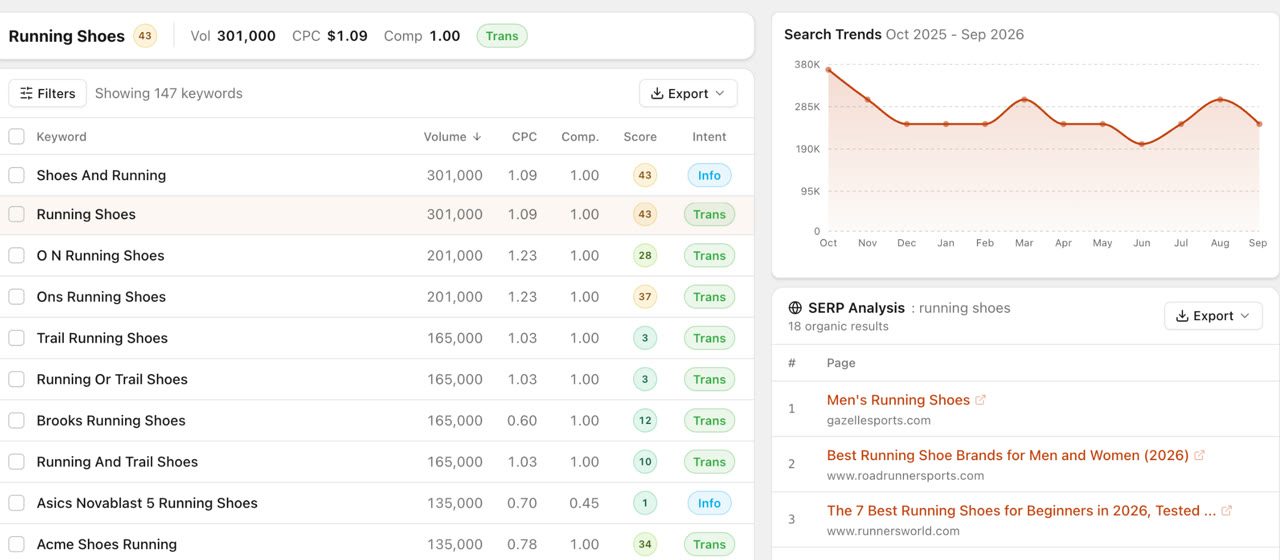
- Search volume: 301,000 a month. An average of monthly searches. Treat it as an order of magnitude, not an exact count. Notice that "shoes and running" shows the same 301,000. When near-identical phrasings share one number, the data source is grouping close variants, so count them as one keyword, not two.
- Difficulty: 43. An estimate of how hard it is to reach the first page, based on the strength of the pages already ranking. It is relative: compare keywords with each other rather than treating any single number as a pass or fail.
- CPC: $1.09. What advertisers pay per click. It is a rough signal of commercial value. A high CPC means someone is making money from that click.
- Competition: 1.00. How crowded the paid ads are, on a 0 to 1 scale. It describes advertisers, not organic rankings, so do not confuse it with difficulty.
- Intent: Transactional. The searcher most likely wants to buy. The other common labels are informational (wants to learn), commercial (comparing options) and navigational (looking for a specific site).
- Trend. The 12-month chart shows whether demand is steady or seasonal. A seasonal keyword is still worth targeting, but the page needs to be live and indexed before the peak, not during it.
All of these are estimates, and different tools show different figures for the same keyword. Compare keywords within one tool and one market.
Step 4: Check the live search results before you decide
This is the step most people skip. The metrics tell you how big a keyword is. Only the live Google results tell you what kind of page wins it.
Look at the SERP analysis for "running shoes" in the screenshot above. Of 18 organic results, the top four are:
- gazellesports.com: "Men's Running Shoes" (a retailer's category page)
- roadrunnersports.com: "Best Running Shoe Brands for Men and Women (2026)" (a retailer's guide)
- runnersworld.com: "The 7 Best Running Shoes for Beginners in 2026" (a magazine review)
- runrepeat.com: "7 Best Road Running Shoes in 2026" (a review site)
Acme, the brand in our example, is not in the top four for this generic term. The results are a mix of multi-brand retailers and independent reviews. That tells you two things:
- Google reads "running shoes" as a shopping-and-comparing search. People want choice and opinions, not a single brand's catalogue.
- To compete here you need either a multi-brand category page or a genuinely useful comparison. A single-brand product page is the wrong format, whatever its authority.
Whenever the tool's intent label and the live results disagree, trust the results. They show what Google currently rewards.
Step 5: Find the realistic targets
Now go back to the table and look for keywords where demand is decent, difficulty is low and you can build the winning page.
In the example list:
| Keyword | Volume | Difficulty | Intent |
|---|---|---|---|
| running shoes | 301,000 | 43 | Transactional |
| trail running shoes | 165,000 | 3 | Transactional |
| running or trail shoes | 165,000 | 3 | Transactional |
| running and trail shoes | 165,000 | 10 | Transactional |
| brooks running shoes | 165,000 | 12 | Transactional |
| o n running shoes | 201,000 | 28 | Transactional |
| asics novablast 5 running shoes | 135,000 | 1 | Informational |
"Trail running shoes" stands out: about half the volume of the head term at a fraction of the difficulty. For a shop that sells trail shoes, a strong trail category page is a far more realistic first target than "running shoes" itself.
A few rules that keep this step honest:
- Brand modifiers need a reason. "Brooks running shoes" has low difficulty, but you can only win it if you actually stock Brooks. "O N running shoes" is another brand's name, spelled the way people type it.
- Model names are often informational. "Asics Novablast 5 running shoes" is labelled informational with difficulty 1. People are researching a specific shoe, which suits a review or comparison, not a category page.
- Low difficulty is not a promise. It means the current results are beatable. You still need a better page than the ones ranking now.
- Small volumes add up. A page that ranks for one main keyword usually also picks up dozens of longer variations. Do not discard a keyword just because its own volume looks small.
Step 6: Group keywords into pages
Once you have a shortlist, group keywords that should be answered by the same page. "Trail running shoes", "running or trail shoes" and "running and trail shoes" clearly want one page, not three. Writing separate pages for close variants splits your effort and makes them compete with each other.
The reliable way to group is by SERP overlap: if two keywords return mostly the same top results, Google sees them as the same topic, and one page can serve both. Doing this by hand is slow, so the keyword clustering guide covers how to automate it.
Step 7: Prioritise and save
For each page group, write down the main keyword, the page type the SERP rewards (category, product, guide, comparison), whether the page exists or must be created, and a priority: business value first, then difficulty, then volume. Pages that already exist and rank in positions 5 to 20 usually go first. They have already proved Google considers them relevant, and improving them is quicker than starting from zero.
Step 8: Track what you publish
Keyword research is a hypothesis. Rank tracking tells you whether it was right. Put the main keyword of every page you publish or rewrite into a rank tracker, check positions on a fixed schedule, and compare against the date you made the change. The rank tracker comparison covers what to look for in a tool.
How to do keyword research in SEO Sauna
SEO Sauna puts each step above in one place.
Keyword Research takes a seed keyword, a country and an optional city. For the seed and every related idea it shows volume, CPC, competition, difficulty and intent, with a 12-month trend chart and a live SERP analysis next to the table. You can filter and export the list, and save the keywords worth keeping to Saved Keywords in your project.
Rank Tracking starts from the keywords your domain already ranks for, so you do not have to type them in.
You choose the keywords, devices, how many result pages deep to check and whether to run weekly or daily, and you see a cost estimate before the tracker runs. The tracked table then shows each keyword's position, the URL that ranks, volume, difficulty, CPC and which SERP features appear, such as AI Overviews, images, People Also Ask, local results and video.
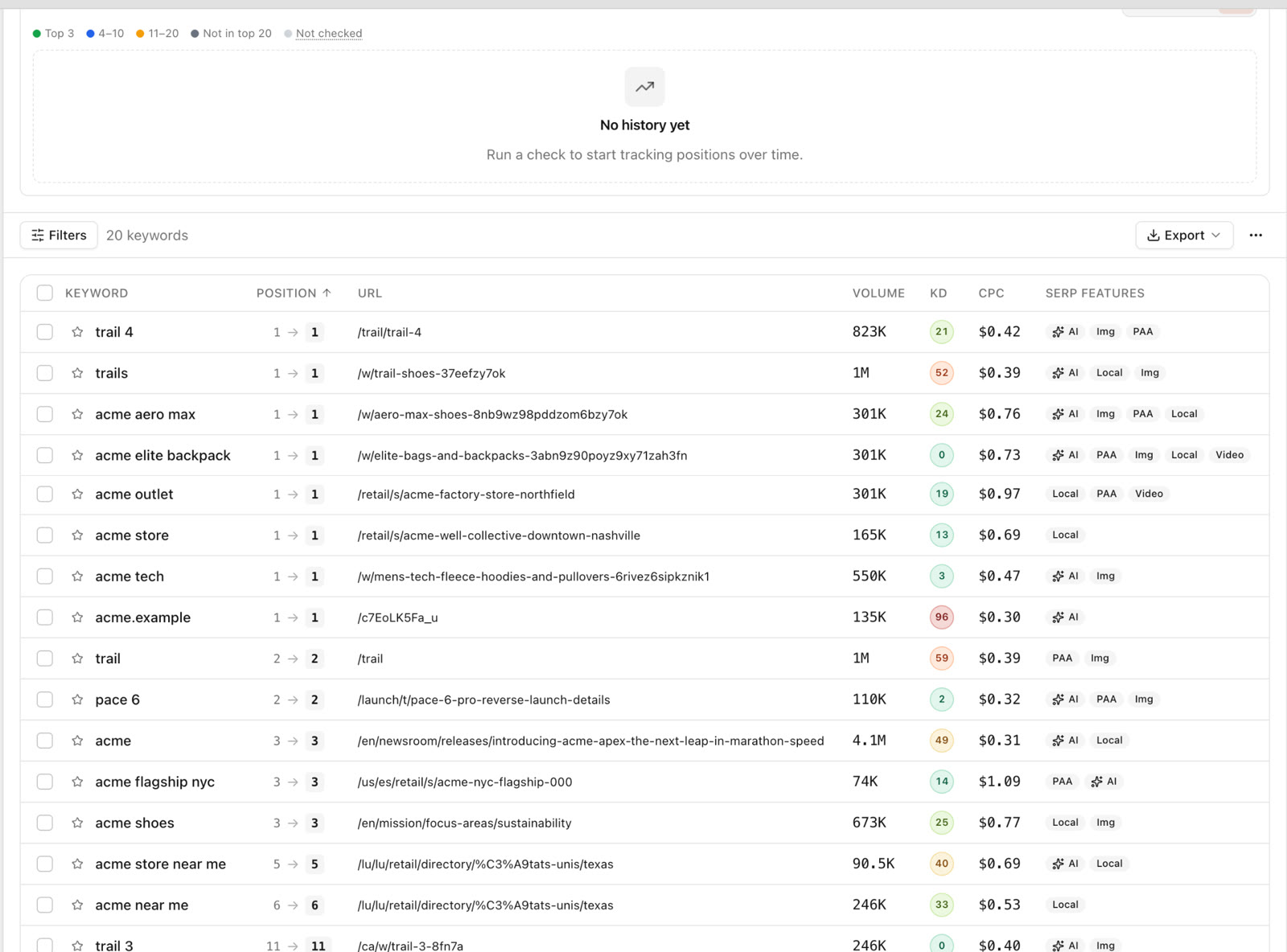 The ranking URL column is worth a look: it shows when Google ranks a different page than the one you intended.
If AI assistants are part of how your audience searches, Prompt Research finds the questions people ask about a keyword together with ChatGPT's answers and cited sources. See AI Overview tracking for the AI side of the picture.
With an AI assistant
Every step also works from Claude, ChatGPT, Cursor or another assistant connected through the SEO Sauna MCP server. That helps with the judgement part: reading SERPs, spotting bad fits and grouping keywords into pages.
Find keyword opportunities around "trail running shoes" in the US with difficulty under 20. Check the top results for the best ten, tell me which page type wins each one, and group them into pages.
The Keyword Research skill gives the assistant a fixed method for this, so you get the same kind of answer each time. The SEO Sauna 101 tour shows where everything sits in the app.
FAQ
How many keywords should one page target?
One main keyword plus its close variants and the related questions the top results also answer. If two keywords return very different results, they need different pages.
What is a good keyword difficulty score?
There is no universal cut-off. A new site should start well below the difficulty of the head terms in its niche; in the example above, 3 to 12 versus 43. An established site can aim higher. Compare within the same tool.
Do I need a paid keyword research tool?
Search Console and Google's own autocomplete get you started for free, but they do not show volume or difficulty for keywords you do not rank for yet. SEO Sauna starts free with 1,000 trial credits and no card. The paid plan is €59 a month excluding VAT and includes 17,000 credits a month.
Wrap-up
Keyword research is a short loop: seeds, ideas, numbers, a real look at the SERP, a realistic shortlist grouped into pages, then tracking. The tools only supply the data. The useful part is the judgement about which searches your site can actually win.
Start free in SEO Sauna and run your first seed keyword. You get 1,000 trial credits and no card is needed.
More from the blog
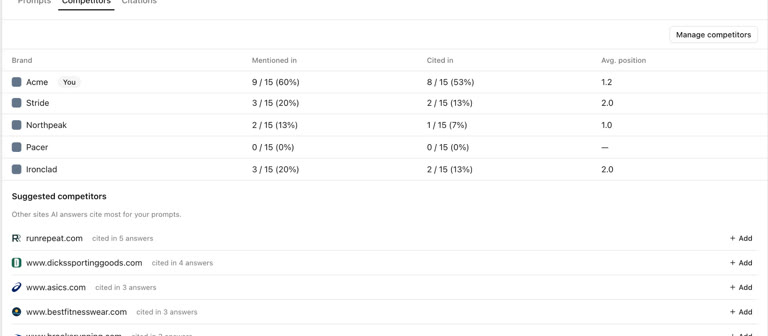 AI discoverability audit: how to run an AI visibility audit
An AI discoverability audit shows whether ChatGPT, Gemini and Google AI name and cite your brand, and why not. Steps, prompts and what to fix first.
AI discoverability audit: how to run an AI visibility audit
An AI discoverability audit shows whether ChatGPT, Gemini and Google AI name and cite your brand, and why not. Steps, prompts and what to fix first.
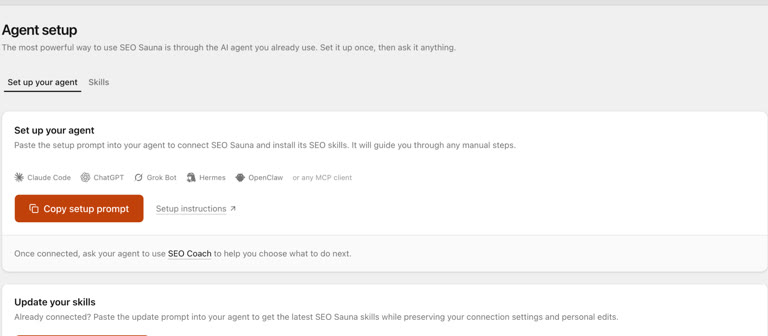 ChatGPT MCP server for SEO: connect live SEO data
Connect an SEO MCP server to ChatGPT as a custom connection on Free or paid plans: step-by-step setup, error fixes and SEO prompts with real keyword data.
ChatGPT MCP server for SEO: connect live SEO data
Connect an SEO MCP server to ChatGPT as a custom connection on Free or paid plans: step-by-step setup, error fixes and SEO prompts with real keyword data.