
Meet SAM: ask your SEO data anything and get the client report
SAM is the AI assistant inside SEO Sauna. It answers from your project's real data and writes client reports under your own logo, as a PDF or a share link.
Most SEO work is not finding data. It is turning data into an answer: why traffic dropped, which page to fix first, what to tell the client this month. That last step usually means exporting tables from three tools and writing the summary by hand.
SAM is the AI assistant built into SEO Sauna, made for that step. You ask a question in plain language, SAM pulls the numbers from your project and answers. Ask for a report and it writes one you can send to a client under your own brand.
This post covers what SAM does, how reports work, what it costs and where its limits are.
What SAM is
SAM lives inside each SEO Sauna project. Open a project and choose Ask SAM in the sidebar. There is nothing to install and no separate account.
SAM already knows the project: its website, market, language and the competitors and goals saved in the project context. It uses the same tools you do in the app:
- Google Search Console clicks, impressions and queries
- Google Analytics 4 organic traffic and key events
- rank tracking positions and history
- site audits
- keyword research, SERP lookups and backlinks
- AI visibility results from ChatGPT, Gemini and AI Overviews
SAM may only state numbers it fetched with a tool. If a tool returns nothing, it says so instead of guessing.
Ask anything about your data
You do not need to know where a number lives. Ask the way you would ask a colleague:
Which pages lost the most clicks last month, and why?
Which keywords does our main competitor rank ahead of us on?
What should I fix first from the latest audit?
Does ChatGPT mention our brand when people ask for the best gym in Tampere?
SAM picks the tools, combines the results and answers for this project. If the same question was researched recently, it shows the earlier conclusion first and asks before spending credits on a refresh.
Client reports from one message
Ask for a report in one sentence, for example "make the October report for this client, for the owner, not an SEO". SAM gathers the data, writes the findings and recommendations in plain language and saves the report to the project's Reports page.
From there you can:
- Export a PDF to attach to an email
- Turn on a share link that the client opens without an account. The link is not indexed by search engines and you can switch it off at any time.
- Use a template so every monthly report follows the same sections and tone
What to put in a good client report is covered in our guide to an SEO report for clients.
Your brand, not ours
Add your logo, name and color under Settings → Organization → Report branding. They appear on every report, PDF and share link. The SEO Sauna name and links into the app do not, so the report reads as your work.
SAM also writes the whole report in one language: headings, labels, dates and footer included.
SAM replies in your language
SAM replies in the language you chose for the app: English, Finnish, Swedish or German. Reports follow the same language. If you write to SAM in another language, it switches to that one.
What SAM costs
SAM is included in the 59 € monthly plan with 17,000 credits. Each reply uses credits based on the AI model's actual cost, and data lookups cost the same as anywhere else in SEO Sauna. Reading Search Console data, and saving or sharing reports, uses no credits.
As an example, a 100-page site audit plus the written report on it came to about 275 credits.
What SAM does not do
- No scheduled reports. SAM writes a report when you ask for it. SEO Sauna does not email reports to clients on a schedule.
- No client logins. Clients get a share link or a PDF, not their own dashboard.
- You still own the judgment. The data is real, but read the summary and recommendations before you send them.
SAM, Claude or ChatGPT?
SAM and the SEO Sauna MCP connection use the same tools. If you already work in Claude, ChatGPT or Cursor, connect SEO Sauna there and keep going. Reports saved from those assistants land on the same Reports page and get the same branding.
SAM is for when you want the answer inside SEO Sauna without setting anything up, or when you hand reporting to someone on your team who does not use an AI assistant yet.
Try it
Open any project, choose Ask SAM and ask the question you would otherwise answer with a spreadsheet. See the SAM page for examples, or the agency page for how branded reports fit client work.
More from the blog
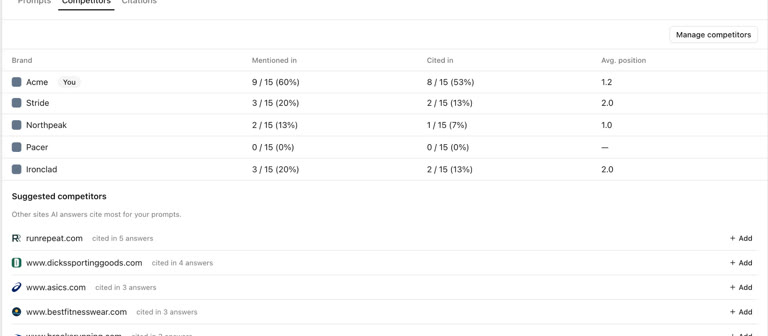 AI discoverability audit: how to run an AI visibility audit
An AI discoverability audit shows whether ChatGPT, Gemini and Google AI name and cite your brand, and why not. Steps, prompts and what to fix first.
AI discoverability audit: how to run an AI visibility audit
An AI discoverability audit shows whether ChatGPT, Gemini and Google AI name and cite your brand, and why not. Steps, prompts and what to fix first.
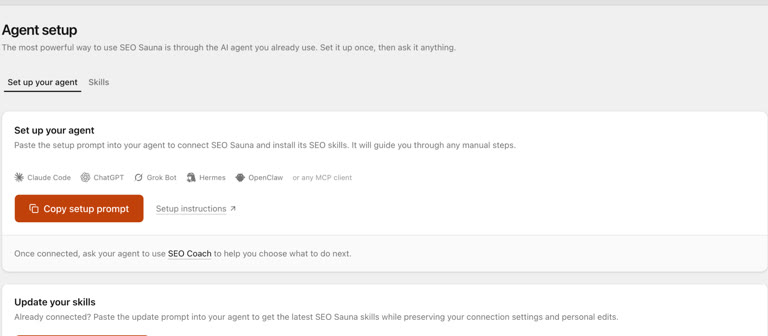 ChatGPT MCP server for SEO: connect live SEO data
Connect an SEO MCP server to ChatGPT as a custom connection on Free or paid plans: step-by-step setup, error fixes and SEO prompts with real keyword data.
ChatGPT MCP server for SEO: connect live SEO data
Connect an SEO MCP server to ChatGPT as a custom connection on Free or paid plans: step-by-step setup, error fixes and SEO prompts with real keyword data.